

We may earn revenue from the products available on this page and participate in affiliate programs. Learn more ›
A wireless surround sound system can change the entire feel of your home theater. No matter what you watch, sound quality makes a world of difference, and these compact connected systems deliver serious step-up audio without professional installation. Most systems include a soundbar, satellite speakers, and a subwoofer, all of which communicate over Wi-Fi with no delay. We’ve tested some of the most popular and powerful wireless soundbars and systems on the market and narrowed them down to these recommendations for any type of viewer. The Samsung HW-990H reigns as the best overall wireless, but the competition gets closer all the time.
- Best overall: Samsung HW-990H
- Also worth considering for music lovers with a Samsung TV: Samsung Music Studio 7 Speaker
- Best splurge: Nakamichi Dragon with Quad 12″ Subwoofers
- Also worth considering: Sony BRAVIA Theater Quad or Sony BRAVIA Theater Trio
- Best design: Sonos Arc Ultra with Sonos Sub and Era 100 or Era 300 surrounds
- Also worth considering for Sonos fans with less space: Sonos Beam Ultra
- Easiest setup: JBL Bar 1300XMKII
- Also worth considering: Adding JBL Cove components
- Best sound quality for audiophiles: Bluesound PULSE CINEMA system
- Also worth considering if you prefer an all-in-one: Focal Mu-so Hekla
- Best for speech clarity: Bose LifeStyle Ultra Home Theater Set
- Best budget multiroom-compatible setup: WiiM Bar + Sub Pro + Sound Speakers
- Best value: Klipsch Flexus CORE 200 + Flexus Sub 100 + Flexus Surround 100 speakers
How we chose the best wireless surround sound systems
I [Markkus Rovito] have previewed and reviewed products—both in the pro audio and home audio realms—on and off throughout most of the 21st century for outlets including Mix, Maximum Tech, DJ Tech Tools, Bob Vila, and some defunct publications printed on paper called magazines. Between the PopSci staff [Stan Horaczek, Tony Ware, Brandt Ranj], we’ve tested variations of these wireless surround sound systems firsthand. Beyond our own favorable experiences, these wireless surround sound systems have all proved popular with expert reviewers. Each of these systems offers something a little different from the others, but they all include rear satellite speakers because we wanted to limit this list to systems that actually surround you with speakers. Some soundbars and soundbar/subwoofer combinations do an impressive job creating virtual surround sound environments (you can read about the best standalone Dolby Atmos soundbars and excellent budget choices that support object-based sound formats if you want some maximized minimalism). Still, this list is for those who want the full experience.
The best wireless surround sound systems: Reviews & Recommendations
From a massively powerful four-subwoofer system to a soundbar that detaches rechargeable, battery-powered rear speakers, these wireless surround sound systems cater to different desires for how deeply immersed you want to be in the sound. If filling a single room with sound just isn’t enough, some options also let you expand into a multiroom system. The common thread is no speaker wire, but no loss of physical speakers that bring true surround sound to your home.
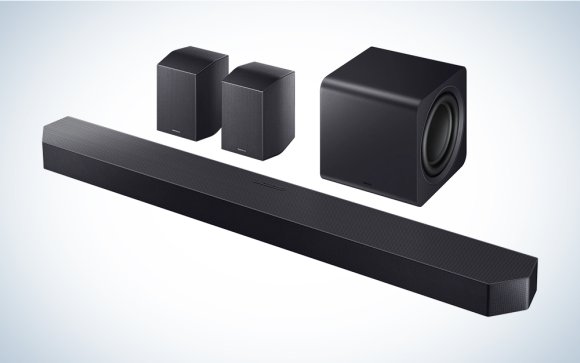
Best overall: Samsung HW-990F

Pros
- Super-crisp voice reproduction makes actors easier to understand.
- Redesigned sealed sub with dual 8-inch drivers keeps bass punchy yet neighbor-friendly.
- Excellent overall sound quality augmented by wireless side speakers with up- and side-firing drivers.
- SpaceFit Sound Pro calibrates in under a minute; Game Mode Pro toggles itself when a console boots.
- Wi-Fi/Bluetooth 5.3 with AirPlay 2, Chromecast, Spotify Connect, and Roon support make streaming painless.
- Q-Symphony lets compatible Samsung TVs add their own drivers as bonus channels, strengthening the center image.
- Samsung TV users can get a wireless Dolby Atmos signal that eschews a cable.
Cons
- Non-Samsung TV users miss out on some features
- Only two HDMI inputs—multi-console gamers may need a switch.
- Long bar (48.5 inches) can overhang narrower TV stands.
Specs
- Audio channels: 11.1.4 (23 speakers)
- Total power/SPL loudness: N/A
- Frequency response: 27.5Hz-20kHz
- Connectivity: 2 × HDMI 2.1, 1 × HDMI eARC, 1 × optical, Wi-Fi, Bluetooth 5.3, AirPlay 2, Chromecast, Spotify Connect
- Format compatibility: Dolby Atmos, DTS:X, and open-source Eclipsa Audio co-developed by Samsung and Google
Why it made the cut: Crystal-clear dialog (especially if you have a 2023 or newer Samsung TV) cuts through the ample atmosphere to make movies and TV shows easy to hear without resorting to subtitles or cranked volume. This is our favorite one-box wonder for tight, impactful low-end within a 360-degree bubble of crisp detail.
We rated the Samsung HW-Q990F soundbar one of the best we’ve heard to date. And our opinion hasn’t changed with this latest update. We’ve actually become even more enamored with Samsung’s flagship thanks to how it improves on its predecessor in a few notable ways, building upon the solid foundation worthy of our top-pick.
It has the same speaker configuration and subwoofer as the HW-990F (which is still worth considering on sale), supports an identical list of audio technologies and wireless streaming services, and can use Adaptive Sound, Dynamic Bass Control, and SpaceFit Sound Pro to optimize the system for your space, making it the best mixed-use setup for most people.
Samsung didn’t reinvent its flagship so much as give it a ruthless tune-up; it shaved unruly resonances, widened HDMI bandwidth, and gave its calibration new tricks. Up front, the bar’s 23-driver array still maps an 11.1.4 dome of Dolby Atmos, but revised amps and height channels give overhead effects more pinpoint spark, so rain in Blade Runner 2049 sounds like it’s hissing off your ceiling, not the wall behind you. Down on the floor, the redesigned subwoofer—now a stout, sealed cube packing dual eight-inch drivers (see the image below)—hits lower and tighter, scrubbing away any port noise we heard from the Q990D’s acoustic lens design. You reclaim carpet space and reduce cabinet buzz for deeper, tighter slam. Explosions in Furiosa: A Mad Max Saga pummel without muddying midrange—ideal when over-the-top characters matter as much as the orchestrated anarchy.
Add in the satellites (see the image below), and anyone and everyone benefits from the familiar four-box array flinging emphatic sound forward, sideways, and overhead. Combine Q-Symphony and a 2023 or newer Samsung TV, however, and you can turn the flatscreen’s built-in speakers into a center-channel booster, soldering dialogue to on-screen lips and expanding explosions, rainfall, and swooping starships into a near-separates hemisphere without hardwire or delay headaches. The TV can even be synced wirelessly.
Two HDMI 2.1 inputs join the eARC output, so a 4K/120 Hz console and a streamer can both live on the bar while the TV handles zero-lag passthrough for high-frame-rate gaming. Plus Wi-Fi streaming from AirPlay to Roon Ready stays in the mix, yet setup still takes mere minutes thanks to SpaceFit Sound Pro auto-calibration and a spruced-up SmartThings app. The Q990H remains the quickest path from Add To Cart to cinema-grade immersion. Cheaper rivals exist, but none combine this power, polish, and plug-and-play ease.
Cosmetic tweaks help it vanish into the room: stealth-fighter angles return in deeper graphite with pin-stripe etching, while the new rounded sub’s short-stack silhouette slides beside a sofa instead of dominating a corner. Under the hood, cooler-running amps and retuned height modules shave fatigue during trilogy binges, and Active Voice Amplifier Pro lifts whispers above the chaos only when needed without forcing you to manipulate the volume. Or figure out where you misplaced the remote, though the SmartThings app is there for you, as well (ain’t connected devices grand).
In addition, the newest model adds Eclipsa Audio, a new 3D audio format born from a collaboration between Samsung and Google. It’s purportedly better at parsing 3D audio metadata from supported audio files to create a more immersive surround sound experience. The 990H also works with Samsung’s Sound App for better configuration and easier setup. A feature called Sound Elevation uses the soundbar’s upward-firing drivers to make audio sound as though it’s coming directly from the TV instead of a soundbar below it. These smaller technical changes add up for something more futureproofed, and are stacked on top of a system that’s the same size as the model it replaced.
For anyone who values finesse without fuss and enjoys couch-shaking blockbusters, Samsung’s incremental polish again delivers the simplest, fiercest path to dome-filling Dolby Atmos without cable clutter—or the bulky demands of discrete components. Firmware updates should further refine tuning down the line.


Also worth considering for music lovers with a Samsung TV: Samsung Music Studio 7 Speaker
Samsung’s Music Studio 7 is a self-contained, 3.1.1-channel, Dolby Atmos-compatible Wi-Fi connected speaker, developed in collaboration with French designer Erwan Bouroullec for a minimalist look that’s easy to integrate into modern decor. And Samsung’s SpaceFit Sound Pro plus built-in mics tune the playback to wherever you place them.
A Music Studio 7 supports Chromecast, Spotify Connect, TIDAL Connect, AirPlay, Hi-Res Audio (up to 24-bit/96kHz), Bluetooth 6.0 in a pinch, and, most distinctively, wireless Dolby Atmos. The side/upfiring drivers plus the built-in woofer are the necessary enhancements over traditional powered speakers. And it’s surprisingly expressive for an all-in-one, set-it-and-forget-it solution. There’s a convincing balance of clarity and low-frequency reinforcement. Want a true, wider stereo soundstage, as well as even more localization for immersive audio? Pair two. It’s a more charitable presentation of your favorite recordings than you’ll get from a soundbar’s smaller drivers. And you can pair select Samsung subwoofers for extra punctuation.
What really sets the Music Studio 7 speakers apart is their ability to also function as a surround system alongside newer Samsung TVs that support the proprietary Q-Symphony protocol. This lets a L/R pair of Music Studio 7 speakers paint an expansive soundtrack while dialogue stays glued to the screen. You should hear a pretty significant improvement in audio quality considering the fact that each Music Studio 7 has five drivers to reproduce object-based audio effects that the limited drivers in a flatscreen TV can’t. With select Samsung TVs, the Music Studio 7’s woofer can even take advantage of Samsung’s AI Dynamic Bass Control to keep low frequencies sounding clear without overpowering the midrange and treble.
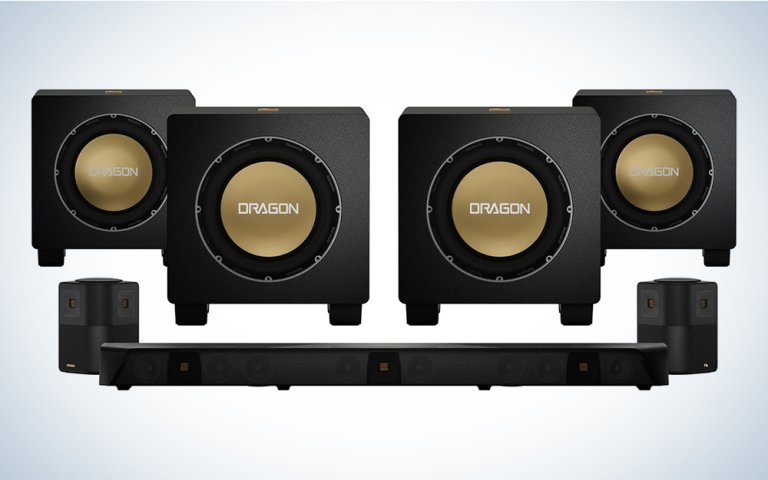
Best splurge: Nakamichi Dragon Home Surround Sound System with Quad 12″ Subwoofers
Pros
- Loud and clear sound with full-spectrum detail and realism
- New and exclusive audio processing improves the performance of immersive Dolby Atmos and DTS:X playback
- Plentiful HDMI 2.1 connections with eARC for supporting the latest TVs and game consoles
Cons
- No room-calibration function for setting up
- Extra speakers mean plugging in extra power cords
- Four subwoofers means you better not have neighbors
Specs
- Audio channels: 11.4.6 with 31 speaker drivers
- Total power/SPL loudness: 5000W/131dB
- Frequency response: 19Hz-22kHz
- Connectivity: HDMI 2.1 input x3, HDMI 2.1 eARC output x1, optical digital audio input x3, coaxial audio input x1, RCA audio input x1, USB, Bluetooth 5.0 aptX HD
- Format compatibility: Dolby Vision with 4K HDR, Dolby Atmos, DTS:X
Why it made the cut: This update to an already proven and powerful system piles on hardware improvements and new software processing to make your wireless home theater a literal and figurative blast.
The Nakamichi Dragon isn’t just a home theater system—it’s an acoustic apocalypse wrapped in brushed metal and obsidian gloss. With quad 12-inch aluminum drivers snarling at 750+ watts each, these wireless subwoofer enclosures don’t whisper bass; it unleashes it wth a force like tectonic plates grinding in a steel amphitheater. The floor rumbles, the walls hum in sympathetic vibration—this isn’t watching a movie, it’s surviving it. Behind you, each Omni-Motion Reference Surrounds, each side- and upward-firing array, is tuned to conjure a dome of Dolby Atmos ecstasy with orchestral precision.
And the 58″ soundbar itself features three Air Motion Transformer (AMT) tweeters, known to audiophiles for hyper-accurate frequency response, as well as six angled upfiring speakers split between 10° and 20° so that overhead sound objects are rendered precisely thanks to Adaptive Height Dispersion Processing. This setup is unapologetically large, power-hungry, and theater-grade. It demands space, power, and reverence. It’s $6,499. It’s the system you buy because deep down, you don’t just want to watch a movie—you want to feel it, in your ribcage, your teeth, and maybe even your soul.
Can’t dedicate the space or budget to the Dragon, but want a taste of its power. Customers and critics alike love the $2,499 MSRP Nakamichi Shockwafe Shockwafe 11.2.6 Ultra, as well as the even cheaper Nakamichi Shockwafe 9.2.4 SSE Max. Like the Dragon, the 11.2.6 Ultra has HDMI 2.1 connections with eARC to the TV to enable the highest quality lossless audio, 4K HDR and Dolby Vision video, and features like variable refresh rate (VRR) for next-gen gaming consoles. It also has Bluetooth 5.0 with Qualcomm aptX HD—rare for a soundbar system—and that lets you stream Bluetooth audio at up to 24-bit digital quality.
The SSE Max designation refers to Nakamichi’s technology for creating realistic 360-degree immersive audio in a home theater. It’s the combination of Shockwafe’s three Spatial Surround Elevation audio processing engines for enhancing the sense of spaciousness to the soundstage, balancing the surround-sound mix across all the speakers, and creating audio height effects for object-oriented formats like Dolby Atmos and DTS:X.
Upgraded hardware includes redesigned extended-range twin-cone drivers in the soundbar, new high-output amplifiers and upgraded drivers in the subwoofers, and 2nd-generation two-way Quad Modular Surround Speakers with new silk dome tweeters and extended-range twin-cone drivers. A new matte-black finish and 2nd-gen backlit remote round out the updates, which Nakamichi based on customer surveys, beta tests, and customer review feedback. A Shockwafe system requires a lot of space, power outlets, and experimentation to find the right setup for the four surround speakers, but it rewards your effort with a powerful and life-like cocoon of sound.
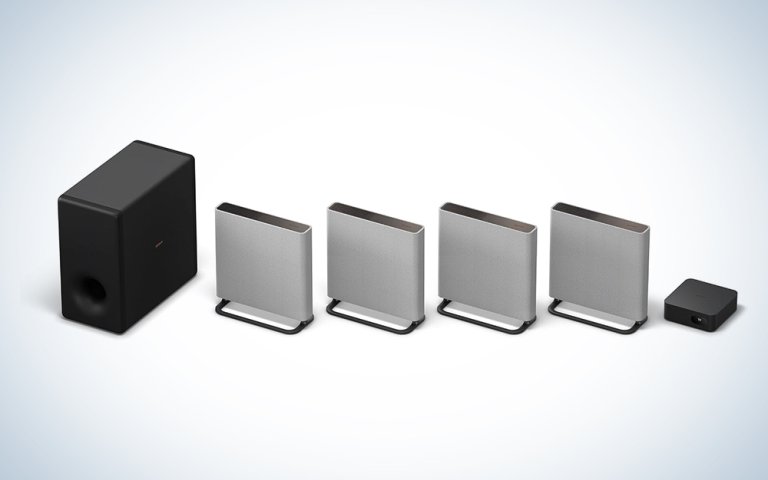
Best splurge for tighter spaces: Sony BRAVIA Theater Quad with SA-SW3 Wireless Subwoofer or Sony BRAVIA Theater Trio
Pros
- Well-balanced, clear, and detailed sound complements both movies and music
- Impressive Atmos performance and effective Immersive AE up-mixing mode
- Can be used free-standing or wall-mounted, with Sound Field Optimization compensating
- Bass power with the SW3 subwoofer
Cons
- The panel-like design is either extremely versatile or extremely challenging, based on your space
Specs
- Audio channels: 7.1.2 with 16 total speaker drivers
- Total power: N/A
- Frequency response: 32Hz-20kHz
- Connectivity: HDMI 2.1 input x2, HDMI 2.1 eARC output x1, optical digital audio input, 3.5mm analog audio input, USB, Bluetooth 5.0
- Compatibility: Dolby Vision HDR, 8K video at 60Hz, 4K at 120Hz, Dolby Atmos, DTS:X, IMAX Enhanced, Sony 360 Reality Audio, Chromecast, AirPlay 2, Spotify Connect, Amazon Alexa
Why it made the cut: Besides its innovative, auto-calibrating engineering, the Sony BRAVIA Quad features HDMI 2.1 inputs and an HDMI 2.1 eARC output, ensuring ready compatibility with the best 4K TVs and even 8K sets.
Sony’s BRAVIA Theater Quad system is the audio equivalent of a laser-etched katana—precise, polished, and deeply potent. Pair it with the SA-SW3 wireless subwoofer and suddenly, your living room transforms into a sonic dojo where cinematic immersion becomes ritual. Four discrete speakers, equipped with upfiring and beamforming tech, unleash Dolby Atmos with spine-tingling verticality. This isn’t sound dispersion—it’s sound architecture. That’s partially because the Quad is designed to integrate flexibly with your actual room’s construction, then tailor its tones to your space. These slim wireless panel-like arrays can be wall-mounted or freestanding, and software compensates for the placement. A control box tucks discreetly beneath your TV, handling the I/O.
And then there’s the SA-SW3 (sold separately): a 200-watt, 6.25-inch wireless subwoofer that doesn’t just punch, it preaches. Every low-frequency thump is delivered with creamy richness—tight enough for orchestral finesse, deep enough to rattle drywall during Michael Bay marathons. Wireless means it tucks neatly into your space like a ninja—out of sight, but never out of earshot.
The BRAVIA Quad system isn’t trying to muscle out competitors with brute force. Instead, it engineers an experience. With Sony’s proprietary 360 Spatial Sound Mapping, every seat is the best seat in the house. Dialogues float, rainfall surrounds, jets soar from behind and above—without a single speaker needing a wiring diagram from hell. Got a Sony Bravia XR TV? Control Quad from the TV menu and hear elevated audio with Acoustic Center Sync. Got a PlayStation 5? The Quad can pass through Auto HDR Tone Mapping and Auto Genre Picture Mode. No matter your TV/console, take advantage of 4K HDR, 8K HDR, Dolby Vision, and HDMI 2.1 gaming features: 4K120, VRR, ALLM.
At $2,999, this isn’t cheap. So you can have a tight space but not a tight budget. But this isn’t just home theater; it’s bringing cinema home—it’s Sony reminding the world that sound, when sculpted correctly, isn’t just perceived—it’s appreciated.


As for the Sony BRAVIA Theater Trio, it can pack a punch if you’ve got room around your screen but none behind you. The centerpiece of this three-piece 3.0.2-channel audio system is a soundbar equipped with a pair of Sony’s X-balanced speaker units, which the company says provides bigger, better bass in a compact cabinet thanks to their rectangular shape. You get the benefits of a soundbar that can comfortably fit beneath your TV without sacrificing audio quality. The bar’s woofers flank a centrally located tweeter.
The Trio doesn’t include a subwoofer (though you can add up to two matched Sub 8 or Sub 9 models), but it does come with a pair of wireless front speakers, each equipped with a forward-facing woofer, tweeter, and upward-firing driver. Sony says the system’s 360 Spatial Sound Mapping feature can make it seem like the driver array includes ceiling-mounted speakers. That virtualization makes sense when you realize Sony expects you to place the speakers next to your TV rather than install them behind you. The included USB-C microphone can be used during setup to calibrate the system to your room by measuring its frequency, phase, and delay characteristics.
While only three components, the BRAVIA Theater Trio is not lacking in features. The system has earned Dolby Atmos, DTS:X, and IMAX Enhanced certification for its expansive soundscape, has an HDMI 2.1 port to pass through audio and video from a source to a TV’s eARC input, and supports several high-resolution and multichannel audio formats on top of AirPlay 2 and Spotify Connect streaming. Pair with a compatible Sony TV (similar to Samsung’s Q-Symphony) and you unlock Voice Zoom 3 dialogue enhancer.
The system also uses AI in three ways: to create a multichannel upmix of stereo audio, enhance the sound of human voices, and upscale lower-quality music to sound better. Though it fits in the small-but-mighty camp, you can add other compatible Rear 9 Sony speakers, plus that Sub 9 or two, to unlock up to 24 phantom speakers and improve the BRAVIA Theater Trio’s performance, if your space increases.
Best design: Sonos Arc Ultra with Sonos Sub and Era 100 or Era 300 surrounds

Pros
- Very spacious surround sound imaging and good Atmos performance
- Smart speaker features and Wi-Fi streaming
- Sleek styling with touch controls on the soundbar and surround speakers
Cons
- Limited connectivity and no Bluetooth
- Room calibration only works through the iOS app
Specs
- Audio channels: 5.1.2 with 17 total speaker drivers
- Total power/SPL loudness: N/A
- Frequency response: apprx. 32Hz-19kHz
- Connectivity: HDMI eARC, Wi-Fi, Ethernet
- Format compatibility: Multiroom audio, Dolby Atmos, Dolby TrueHD, Apple AirPlay 2, Siri, Amazon Alex, Google Assistant
Why it made the cut: Combining the Sonos Arc soundbar with the Sonos Sub (Gen. 3 and/or Gen. 4) and two Sonos surround speakers makes for a stunning ensemble both visually and audibly.
This intelligent wireless surround sound combination can be purchased as a single bundle for just over $2,000. But if that feels like too much upfront and you want to assemble components piecemeal, it’s worth it to procure the Sonos Arc Ultra soundbar, a Sub subwoofer or two, and a pair of Era 100 surround speakers gradually to create a formidable home theater system that you can also easily connect with your TV and any number of Sonos products to make a whole-home audio setup. The Arc Ultra gives you Dolby Atmos playback through top- and side-firing speakers, as well as an HDMI eARC connection (which enables high-resolution audio), Apple AirPlay 2 streaming, and smart speaker features like built-in voice control with Amazon Alexa, Google Assistant, and Siri. The Sonos app lets you connect most other streaming services, and the iOS version can run auto-calibration to tune the speakers’ response to your particular space.
The Arc Ultra’s minimal aesthetic has limitations, such as a single HDMI connection and an app-only remote control. However, it emits precise mid-range and high frequencies, as well as a surprising amount of smooth, rattle-free bass, thanks to the new Sound Motion transducer. And if you want more low-end reinforcement, you can pair up to two Subs, each of which features dual force-canceling drivers that add weight to the presentation while relieving pressure on the other speakers, allowing for more finesse throughout the frequency range. Touch controls for volume, play/pause, and track skipping (by swiping left or right) on both the Arc and the Era 100 surround speakers can come in handy when you’re locked to the couch, and those extra LS/RS channels take the impressive performance of the Arc Ultra into the next level of genuine surround sound. (You can find more in-depth information on the best Sonos speakers in our dedicated guide.)
If you’re looking for the absolute best design for Dolby Atmos content, however, upgrade the rear speakers to a pair of the Era 300, which are purpose-built with six multidirectional drivers to unfurl the full immersive potential of spatial audio. Whether it’s an album on Apple Music or Mad Max: Fury Road, the full $2,500 7.1.4 setup lets you experience instant gratification and ongoing exhilaration. (A single Era 300 also works as a standout standalone speaker if you’re just looking to turn any old corner into a multidimensional performance, so this is the best splurge if you desire a modular multiroom system.)
Want to experience immersive spatial audio, whether you’re on the go or the household has gone to bed? The Sonos headphones Ace support the latest surround sound tracks through Dolby Atmos movies and music and TrueCinema processing, establishing a dynamic bubble that won’t disturb others. Available in white or black, these headphones also offer flagship-level Adaptive ANC and physical comfort, 30 hours of battery life, and support for lossless listening via USB-C or wirelessly if you have an Arc Ultra soundbar. Thanks to a recent firmware update, you can even use a pair of Ace headphones with one Arc Ultra for a private viewing party for two.
Also worth considering for Sonos fans with less space: Sonos Beam Ultra
Maybe the Arc Ultra is a bit wide for your credenza. Luckily, Sonos has gone ahead and “ultrafied” its Beam soundbar, which manages to be both a massive upgrade over its predecessor while giving the Arc Ultra a run for its money in many respects. In our tests, the nine-driver 7.1.2 Beam Ultra delivered surprisingly deep bass and solid Dolby Atmos performance without the addition of a subwoofer or wireless rear speakers respectively (though you can add them, as with the Arc Ultra). The fact that it does so in such a small package (it’s a touch under 30-inches wide and a little over 2.5-inches tall) is equally impressive. It’s a soundbar you can easily slip under any TV, and on top of any media center.
The Beam Ultra supports Bluetooth and AirPlay 2, but you won’t find integration with any other wireless audio standards here. Sonos did build in a USB-C port, which you can use to hook up a wired audio source using the company’s Line-In Adapter. Sonos doesn’t offer a line-in option on its other soundbars, and it’s a particularly helpful addition if you’d like to create an all-encompassing compact wireless home theater system with the option to hook up your turntable or DAP. The Beam Ultra blows every other compact soundbar we’ve tested out of the water in terms of both audio and build quality, and deserves serious consideration as an alternative to the Arc Ultra. Sonos’ most premium soundbar has more drivers and features Sonos’ Sound Motion technology for subwoofer-levels of bass, but it’s also appreciably larger and more expensive.
Sonos launched the Beam Ultra alongside its Ace Ultra over-ear headphones, which feature a freshly re-engineered driver, more sophisticated 8-band and Adaptive EQ, more microphones for improved ANC, and support for Dolby Atmos with head tracking. The headphones, which we’ve also tested, are an improvement over Sonos’ first-generation cans in terms of overall audio quality. The new driver makes music and movie soundtracks sound smoother, and having the ability to tweak their sound is appreciated. The marquee feature, of course, is the improved protocol that pairs the Ace Ultra headphones to a compatible Sonos speaker, allowing you to see the headphones as a standard endpoint in the Sonos app (as well as Spotify Connect, etc.), and stream music directly to them while on the same Wi-Fi. The previous Ace headphones just partnered with an Arc soundbar to play whatever was being fed to that bar, so this is far more versatile (though you can still use them as private cinema speakers). Finally, there’s Bluetooth 6.0 with AAC/aptX Lossless and high-resolution USB-C for when you’re out of the house.
Easiest setup: JBL Bar 1300XMK2

Pros
- Detachable battery-powered rear speakers recharge from the base soundbar.
- MultiBeam 3.0 and PureVoice 2.0 support for a wider soundstage and clearer dialogue
- 3 HDMI inputs turn the soundbar into a de facto stereo receiver
- Dolby Atmos and DTS:X height effects from four up-firing speakers.
- Crisp, balanced sound appropriate for all uses.
Cons
- Price
- Width
- The times you forget to recharge the detachable satellite speakers
Specs
- Audio channels: 11.1.4 with 12-inch wireless powered subwoofer
- Total power/SPL loudness: 1170/97.8dB
- Frequency response: 33Hz-20kHz
- Connectivity: HDMI 2.1 inputs (3x), HDMI 2.0 eARC output, optical digital audio output, USB, Wi-Fi, Bluetooth 5.3
- Format compatibility: Dolby Vision with 4K passthrough, Dolby Atmos, DTS:X, Chromecast, AirPlay 2
Why it made the cut: JBL cuts all but the power cords with its Bar 1300XMK2 audio system, which uses the soundbar to charge detachable battery-powered rear surround speakers that don’t even have to plug into wall outlets.
JBL’s Bar 1300XMK2 is the company’s latest premium modular wireless surround sound system, and its $1,700 price tag is justified by both its audio quality and user-friendliness. Setting up the system took about five minutes and three cables: two power cords for connecting the soundbar and subwoofer to outlets and an HDMI wire running from the Bar 1300XMK2 to our TV’s HDMI eARC port. The TV immediately recognized the soundbar the next time it was turned on and routed sound through the Bar 1300XMK2. (However, depending on the age of your TV and its operating system, you may need to enter your set’s sound settings to switch from its internal speakers to the soundbar.)
The Bar 1300XMK2 features the same signature configuration as JBL’s other soundbar-based sound systems (such as the more compact JBL Bar 700 and the previous flagship, the still-available JBL Bar 9.1): the rear wireless surround speakers come physically attached to the main soundbar. This charges their batteries, in addition to giving the 11-driver soundbar a wider stereo soundstage, and is appropriate if you don’t have space behind you for satellites. The upward-firing drivers are still active when the surround speakers are attached to the main bar, which can create a more immersive environment even if all components are on your credenza. For a more authentic surround sound experience, however, you’ll need to detach the rear speakers and place them physically behind you.
Impressively, the Bar 1300XMK2 automatically detected when the surround speakers were detached and maintained a wireless connection to them. No special configuration was necessary, nor did we have to press the Bluetooth buttons on the back of our rear surround speakers; the system just adapted and worked. Similarly, the wireless subwoofer and soundbar paired together immediately. We put this soundbar system through its paces by watching an assortment of TV shows, movies, and YouTube videos, and were very pleased with the way it sounded. Among our selections were Rolling Thunder Revue: A Bob Dylan Story and Creedence Clearwater Revival at the Royal Albert Hall on Netflix and 1971: The Year That Music Changed Everything on Apple TV+. The soundtracks to these films also allowed us to assess the Bar 1300XMK2’s ability to play music.
The sounds of exploding bombs or gunshots never overwhelmed the subwoofer and even sounded clear when coming from the surround speakers. A well-designed center channel driver ensured we could hear dialogue clearly even when a lot of action was going on without having to select a specific voice booster mode. We ultimately preferred keeping the surround speakers connected to the bar when watching videos with a stereo mix as it provided a wider soundstage. When it came to watching TV shows or movies with a Dolby 5.1 or Dolby Atmos soundtrack, we immediately removed the wireless speakers and put them behind us. The Bar 1300XMK2 was so good that we could quickly determine whether the person mixing the audio was making adequate use of the rear channels in their mixes.
Two new features that weren’t present in the soundbar’s predecessor, the still-excellent Bar 1300X, are MultiBeam 3.0 and PureVoice 2.0. The latest version of MultiBeam does an even better job at creating a compelling spatial audio environment when enjoying Dolby Atmos audio, and widens the soundstage considerably when enjoying stereo content. PureVoice 2.0 rebalances the soundbars audio to boost voices. JBL also made technical improvements to the soundbar, including adding support for Bluetooth 5.3 (previously 5.0), building in HDMI 2.1 (up from HDMI 2.0), and most impressively adding three HDMI inputs to the soundbar (previously one). That last feature allows you to hook up your game consoles, 4K Blu-ray player, and other peripherals to your TV using the soundbar, which cuts down on cable clutter.
We couldn’t find any significant fault in the Bar 1300XMK2’s technical or audio quality and found the convenience of this wireless surround sound system irrefutable, but you’ll have to pay a high upfront cost to take advantage of it.
Also worth considering: Adding JBL Cove components
Even though the JBL Bar 1300XMK2 comes with detachable rear speakers, you might want more output or more versatility. That’s where the JBL Cove 3.0-channel M1 and/or 3.0.1-channel P1 come in. A pair of these whole-home speakers can work as expressive reach channels paired with any MK2 Series soundbar, not just the top-of-the-line 1300XMK2. Pick two M1s if you want something more compact and height effects aren’t as important, or step up to the P1s to get an upfiring driver and a built-in battery, in case you want to wander away from your home cinema setup and just jam out on some tunes. You can also place two in your TV area and plant more of these models, or the step-up X1 flagship, around the house and seamlessly pass off music (including Dolby Atmos-encoded tracks) wherever the mood takes you.
Best for high-resolution audio: Bluesound PULSE system

Pros
- Supports 24-bit/192 kHz high-res audio, including MQA decoding and Roon Ready
- Can expand to a multiroom audio system
- Excellent preset audio modes for different scenarios
Cons
- Not sold with bundled pricing
Specs
- Audio channels: 7.1 with 11 total speaker drivers
- Total power/SPL loudness: W/ dB 120W soundbar, 25W Flex
- Frequency response: 22Hz-20kHz
- Connectivity: HDMI 2.1 eARC, optical digital audio input, 3.5mm analog audio input1, USB Type-A, Bluetooth aptX HD, Wi-Fi, Ethernet
- Format compatibility: 24-bit/192 kHz audio, Dolby Atmos, Amazon Alexa, Google Assistant, AirPlay 2, Spotify Connect, Tidal, Pandora, Amazon Music, MQA high-res audio
Why it made the cut: Audiophile-grade sound combines with powerful internal processing in a system that can expand to multiroom audio.
If you’re willing to piece your purchases together, the Bluesound PULSE “by audiophiles for audiophiles” wireless surround sound system is technologically very versatile and the first multiroom system to support the MQA format that “folds” and “unfolds” digital data to stream high-res audio without a ton of bandwidth. With the SOUNDBAR+ as its centerpiece (shown above), combined with a dual-band Wi-Fi 802.11ac-equipped PULSE SUB+ and two equally wireless PULSE FLEX 2i or PULSE M satellite speakers, the system can expand two-channel stereo content into a spacious soundstage thanks to Bluesound’s audiophile-grade drivers, high-performance digital-to-analog converter, and clean, powerful Class D amplification. The eight-speaker forward-facing configuration of a 1-inch tweeter, 2-inch mid-range driver, 4-inch woofer, and 4-inch passive radiator—one set left and one right—is optimized for music streaming thanks to a powerful quad-core ARM processor that handles high-quality audio with blazing speed. The resulting, authoritative sound handles vocals with visceral detail, while the overall tonality is balanced, never artificial. Lows and mids sound warm yet not fuzzy, and the treble is precise without sounding harsh.
If you have a wealth of advanced-resolution downloads/personally ripped digital music, Bluesound can be used as a Roon endpoint if you’ve set up a compatible music server on your local network. Otherwise, you can stream lossless music directly from iOS devices via AirPlay 2 on Wi-Fi and/or higher-bitrate, though still lossy transmissions via any device that supports Bluetooth (compatible Android devices can even connect via aptX HD). If you subscribe to Spotify and/or TIDAL, both services have a natively supported “Connect” service, so the highest quality stream will go directly via Wi-Fi to the SOUNDBAR+, bypassing your phone. The BluOS app consolidates source control, as well as offers some EQ. Connected to the TV via a single HDMI (e)ARC connection, the dimensionally tall, but aesthetically unobtrusive Bluesound PULSE SOUNDBAR+ decodes Dolby Atmos material directly but with nuance, although with more subtlety in its height rather than in its width due to the lack of up-firing drivers. It presents music compellingly without any processing, although there are some interesting audio modes and upmixing options with which to experiment.
According to our managing editor, who has experienced a complete Bluesound PULSE set-up, adding in a pair of FLEX 2i speakers allows sonic textures to be even more open and expressive—most impactful when watching demo-worthy Atmos films like Mad Max: Fury Road and Baby Driver or while playing a selection of spatial audio from Apple Music on the Apple TV 4K. Music, especially, feels authentic, a well-rounded presentation from a flat facade—the SOUNDBAR+ with surrounds assures every track’s scope is fully conveyed without losing anything granular as it unfurls. And if you have high ceilings or a wider, open viewing space, adding in physical surround speakers makes a world of difference when compared to soundbars that use reflections to convey dimensionality.
On the other end of the spectrum, the SUB+ offers versatile, visceral LFE reinforcement, its 8-inch long-throw driver and 150-watt amplifier taking the 70Hz cap of the SOUNDBAR+ down to 22Hz. Capable of lying flat under a sofa or sitting up against a wall, the sealed enclosure is easily integrated physically into any room layout (wall outlet allowing) and digitally via the home network and the BluOS app. As for what the SUB+ adds sonically … it’s tunefulness. It’s a subwoofer that’s far more about nimble pluck than unchecked pump; though it can reach dynamically deep, the SUB+ impressed far more with its dexterity. If you value realism as much as rumble, the SUB+ is another amazing addition to the Bluesound ecosystem.
Not watching anything or wanting to restrict your soundtrack to a single room? You can relocate an ultra-compact mono PULSE FLEX 2i or even more expressive omni-hybrid stereo PULSE M speaker around your home (or just get extras for other zones). As long as they are all on the same Wi-Fi network, you pass whatever music you’re streaming from speaker to speaker if you move to specific areas or have it play simultaneously throughout the house—wherever the action is.
Best budget multiroom-compatible setup: Denon Sound Bar 550 + Components

Pros
- Modular system expandable to as many speakers in as many rooms as you want
- Rear speakers include controls, Bluetooth pairing, and audio inputs
- Good aesthetic appearance with matching cloth speaker coverings
- Clear, balanced sound
Cons
- Some HEOS app setup snafus and instability with the rear speakers
- No up-firing drivers for spatial audio formats
- No Chromecasting for sending Atmos music from mobile devices
Specs
- Audio channels: 5.1 with 11 total speaker drivers
- Total power/SPL loudness: N/A
- Frequency response: N/A
- Connectivity: HDMI 2.1 input x1, HDMI 2.1 eARC output x1, optical digital audio input x1, minijack audio input x1, USB, Bluetooth, dual-band Wi-Fi
- Format compatibility: 24-bit/192kHz audio, Dolby Atmos, DTS:X, Dolby Vision w/HDR 10, Amazon Alexa, Google Assistant, AirPlay 2,
Why it made the cut: Denon Home’s wireless, multiroom audio system offers a less-expensive option for starting small but eventually building a whole-home speaker empire.
When you may not have the funds to purchase the wireless surround sound system you most want responsibly, you could compromise and buy a lower-end system … or you could play the long game, exercise a little patience, and buy components one at a time until you’ve built something great. The Denon Home family of wireless speakers lets you do the latter at lower prices than the other multiroom-capable systems. You can pick up the Sound Bar 550, the Subwoofer, and 150 Wireless Speakers individually or start with a bundle of the soundbar/subwoofer or soundbar/wireless speakers.
“Budget” is in the eye of the beholder. Still, ultimately, the Denon Home components should total around $1,500 and save you several hundred over comparable purchases from the Sonos or Bluesound multiroom systems. Denon Home also has 250 wireless speakers and 350 wireless speakers, which are larger speakers with more driver units inside, better suited for being the sole audio source in their own room, like an office or bedroom.
The Denon Home system uses the HEOS app to link all the speakers together, update firmware, and control what audio or music is playing from which room, if you have speakers in multiple rooms. HEOS also consolidates all the compatible music services and sources available into one place, such as Spotify, Tidal, Deezer, SoundCloud, Amazon Music, music stored on your phone, and more. In our firsthand testing of the Denon Home Wireless 5.1 Home Theater System, the setup caused some frustration with failed firmware updates and the app not pairing at first with the wireless speakers and subwoofer to the soundbar. Unlike many other wireless systems where the soundbar recognizes and pairs with the sub and surround speakers automatically, you have to connect each Denon Home speaker individually to your home network via HEOS and then pair the speakers to the soundbar. After several attempts to do so with HEOS showing that pairing failed, the subwoofer and wireless speakers eventually just started working with the soundbar. After that, the system worked together, but the 150 Wireless Speakers did experience a connection problem where the audio crackled or flickered on and off. However, cycling the power solved that.
The compact Sound Bar 550 measures only 26 inches wide and looks living-room-ready with its attractive fabric-lined enclosure and illuminated touch controls on the top panel for volume, play/pause, and muting the built-in Alexa voice control function. Its small remote has separate level controls for overall volume and bass, audio mode and source, and a Bluetooth pairing button. When tested as a standalone speaker, the soundbar’s forward-facing six drivers and two passive radiators do a decent job of downmixing surround-sound sources into a spatially separated mix. You do get a real sense of separation between, say, the characters and their environment in a movie.
Denon Home doesn’t disclose any wattage or SPL numbers for its units, but the Sound Bar 550 isn’t extraordinarily loud for its size. It can suffice as the TV’s soundsystem in an average-sized living room, but if you like high volume, the Sound Bar 550 distorts some when you crank it up to the max, so it’s better for more modest listening. Its sound, however, is clean and well separated in the frequency ranges. Dialog in movies and TV shows pierced through the mix in most cases, and music shimmered with a stereo soundstage belying the soundbar’s size. In the right sweet spots, it does have more impressive bass power than expected but does benefit greatly from adding the Denon Home Subwoofer.
It is Atmos and DTS:X compatible; however, without up-firing speakers, the object-based immersive audio effects don’t fully translate to your 3D environment the way they were originally intended. Adding the 8-inch, downward-firing subwoofer and two 150 Wireless Speakers to the mix made big improvements both aurally and functionally. Each 150 unit has its own volume and play/pause touch controls that work for the entire system they’re paired to, so it’s quite convenient to reach over the couch to a rear speaker and flick the volume if needed. The 150s also let you initiate Bluetooth pairing and have USB storage inputs and minijack audio inputs, which will also send their audio to the entire system.
While the system as a whole still didn’t reach the decibel levels of many others in this guide, it made watching “event” movies like the Atmos-ready Thor: Love and Thunder an immersive good time, even though the spatial Atmos effects aren’t fully supported with height-based drivers. Switching to the Movie (DTS Virtual:X) preset gives Atmos material a slightly more expansive sound. During PlayStation 5 games like Horizon Forbidden West, the Denon Home system tracked the character movements well, keeping the surround mix believably positioned and clearly representing the mix of sounds from playable and non-playable characters, the natural environment, and the crucial rumblings and fumblings of enemies in the distance.
For music, the full system can become a single stereo powerhouse with all the speakers working together as a stereo system. Pairing various Bluetooth devices was easy and smooth, with no dropouts in our testing. For audio fidelity, however, streaming over AirPlay 2 sounds markedly better (Denon does not list a Bluetooth codec for the system, which could be baseline SBC). When comparing the same audio sources played over Bluetooth and then AirPlay 2, the AirPlay signal sounded much more full and vibrant overall, with deeper, rounder bass.
Overall, the Sound Bar 550 is a wonderful upgrade from internal TV speakers, even if the soundbar can’t pretend to offer anything other than virtual surround sound. The 150 speakers still don’t have any up-firing drivers for Atmos material. However, adding two wireless surrounds and the subwoofer resulted in full-spectrum audio that satisfied the need for a booming surround sound experience. And the ability to keep more rooms full of sound without fully emptying your pockets is attractive, indeed.
Best value: Klipsch Flexus CORE 200 + Flexus Sub 100 + Flexus Surround 100 speakers

Pros
- Built-in subwoofers
- Upward-firing drivers for Atmos height channels
- Can be augmented with a dedicated subwoofer/surround speakers
Cons
- Less connectivity than competition (you need to route sources through the TV)
Specs
- Audio channels: 3.1.2 with four 2.25” ceramic drivers finely tuned by Klipsch acousticians and dual 4” built-in subwoofers
- Total power/SPL loudness: N/A
- Frequency response: N/A
- Connectivity: Bluetooth, HDMI eARC, Digital Optical, USB
- Format compatibility: Dolby Atmos
Why it made the cut: We’ve never heard better bass response or single-point surround sound from another compact soundbar at this price point (or a bit beyond).
The Flexus CORE 200 is the newest soundbar from Klipsch, and it’s quickly become one of the best we’ve ever tested. At 44 inches wide, you’ll need a media center to accommodate the home theater speaker, but not nearly as much space as some of our other picks. And you’ll be rewarded handsomely once you hear how music, video games, and movies sound. The Flexus CORE 200 has six 2.25 ceramic drivers (one on the left and one on the right, two in the center, and two facing upward) plus two 4-inch subwoofers. We’ve never heard better bass response or single-point surround sound from another compact soundbar at this price point (or a bit beyond).
The low end was shockingly tight when listening to explosions while playing games like The Legend of Zelda: Breath of the Wild on the Nintendo Switch OLED or titles with bombastic bopping soundtracks like Penny’s Big Breakaway. The Flexus CORE 200 could recreate the ambiance of a theater or hall when watching comedy specials like Neal Brennan’s Crazy Good and Demetri Martin’s Demetri Deconstructed. Even casual YouTube videos sound great, with clear separation between voiceovers and sound effects.
This performance is possible because Klipsch partnered with Onkyo when developing the Flexus CORE 200. The former designed the enclosure and acoustic components, while the latter was in charge of developing the processor inside. Onkyo has a long history of making AV receivers and amps and has brought that expertise to the table in a big way. It’s no surprise that their technology was able to recreate the experience of listening to a more traditional multi-speaker multichannel setup.
On its own, we can recommend Klipsch’s Flexus CORE 200 as a premium 3.1.2-channel soundbar for anyone who’s at least a little surround sound curious. However, we were also able to test it alongside Klipsch’s new $299 10-inch Flexus Sub 100 and $249 wireless Flexus Surround 100 speakers. This trio is a grand slam, offering better-balanced sound and more immersive audio experiences when listening to Dolby Atmos mixes of albums like The Beach Boys’ Pet Sounds and Pink Floyd’s Dark Side of the Moon, with spatial audio ping-ponging off the ceiling and walls around you.
Whether you use it on its own or with Klipsch’s optional satellites/sub, we cannot find a major fault with the Flexus CORE 200 system. If you have enough space, it’s a home theater upgrade you’ll deserve.
Things to consider before buying the best wireless surround sound systems
Maybe you enjoy clearing space for floorstanding speakers and subwoofers, unspooling many feet of speaker wire across your media room, and crawling behind a cabinet to route all your sources through an A/V receiver. Well, we’ve got suggestions for that elsewhere. But if you’d prefer to enjoy full-room, real surround sound with speakers behind or beside you, minus any messy entanglements, we’ve got you. The best wireless sound systems deliver audio as vivid as that new OLED TV, and they do it without any noticeable latency between sound and image. Many of these systems also include mobile device sharing via Apple AirPlay 2 and/or Google Chromecast and support voice control from smart assistants. They let you stream music wirelessly over Bluetooth and/or Wi-Fi. While wireless surround sound systems still cost a few bucks more than wired equivalents, this guide shows you the best options across a variety of price points and feature sets.
Remember, however, that calling a surround sound system “wireless” means that you don’t have to attach any speaker wire to the speakers. They also let you stream audio and/or video wirelessly from devices over Bluetooth, Wi-Fi, or both. But that doesn’t mean zero cables. To use them with a TV, you need to connect the main soundbar or base unit via HDMI to the TV, and then the rest of the speakers receive an audio signal wirelessly. Each speaker also has to plug into a power outlet, unless they’re battery-powered (as in the case of the JBL Bar 1300XMK2’s rear surround speakers). And you might need to crawl around a little to find the perfect place for your subwoofer.
Budget
Wireless surround sound systems tend to be more expensive than equivalent wired systems because you still pay a bit of a premium for the extra convenience and tidiness of a wireless system. The systems here range from around $1,000 (for the complete Klipsch system) to over $3,000 (for the top Nakamichi and Sony systems with all their listed components). Prices may fluctuate somewhat from month to month because of chip shortages/supply chain issues, and there are brands that make even more approachable budget options, but don’t expect wireless surround sound systems to plummet in price too much anytime soon.
Sound quality
Whether a surround sound system is wireless or wired does not really determine its sound quality. Other factors matter, such as the quality of the source audio and the construction and materials of the speakers. Most people will not notice much difference between a modern-day wireless system and a wired alternative. However, connoisseurs of audio quality seeking out a wireless surround sound system may want to ensure that it supports 24-bit digital audio so that it’s compatible with high-resolution formats. The Bluesound PULSE CINEMA system here supports 24-bit/192 kHz digital audio, a resolution limit so high that you’d have to search specific niches for audio material that maxes it out.
Do you want a multiroom system?
A wireless surround sound system for your TV room may be all you’re into for now. Still, if you’re thinking about expanding to a multiroom speaker system where you can share/pass source audio between different rooms in your abode, there are options here. The Bluesound PULSE CINEMA system, WiiM Bar and Sound Speakers, and Sonos Arc Ultra or Sonos Beam Ultra plus Era 100 or Era 300 support building multiroom systems with a variety of different add-on units.
FAQs
Soundbars that virtualize surround sound simply aren’t as good as true surround-sound systems, meaning systems with physical satellite speakers that often sit behind you, sometimes to your left and right, and occasionally even above you in high-end Dolby Atmos home theaters. Today’s advanced soundbars with high-tech immersive audio processing can offer a decent illusion of surround sound that is definitely a big step up from internal TV speakers. However, the best surround sound systems still actually have to surround you with physical speakers.
You most often connect a TV to a wireless surround sound system with an HDMI cable that passes both video and audio to and from the TV to either the main soundbar or otherwise some small base hub unit. In the rare case your TV does not have an HDMI ARC input, you can connect the TV to the sound system using both HDMI and digital optical audio cables.
There is no completely wireless surround sound system if you consider wires to include power cords and HDMI cables, because the term “wireless surround sound system” means that you do not have to connect any speaker wire to any of the surround speakers or the subwoofer, the way you have to connect speaker wire to the speakers of some home theater systems that are powered by amplifiers. Today’s wireless surround sound systems still need to connect to a TV with an HDMI cable, and you need to plug in a power cord to various components such as a soundbar or a subwoofer. You can find some options, such as the JBL Bar 1300XMK2, that have rear speakers powered by rechargeable batteries, eliminating two power cords from the setup. However, there’s not a wireless surround sound system yet that doesn’t need at least an HDMI cable and a couple of power cords.
Final thoughts on the best wireless surround sound systems
- Best overall: Samsung HW-990H
- Also worth considering for music lovers with a Samsung TV: Samsung Music Studio 7 Speaker
- Best splurge: Nakamichi Dragon with Quad 12″ Subwoofers
- Also worth considering: Sony BRAVIA Theater Quad or Sony BRAVIA Theater Trio
- Best design: Sonos Arc Ultra with Sonos Sub and Era 100 or Era 300 surrounds
- Also worth considering for Sonos fans with less space: Sonos Beam Ultra
- Easiest setup: JBL Bar 1300XMKII
- Also worth considering: Adding JBL Cove components
- Best sound quality for audiophiles: Bluesound PULSE CINEMA system
- Also worth considering if you prefer an all-in-one: Focal Mu-so Hekla
- Best for speech clarity: Bose LifeStyle Ultra Home Theater Set
- Best budget multiroom-compatible setup: WiiM Bar + Sub Pro + Sound Speakers
- Best value: Klipsch Flexus CORE 200 + Flexus Sub 100 + Flexus Surround 100 speakers
The HW‑Q990F is Samsung’s latest rabbit from that hat, and after dynamic movie marathons, midnight gaming sessions, and neighbor‑testing playlists, I’m convinced Samsung has again balanced raw spec‑sheet bravado with day‑to‑day living‑room sanity by making small yet meaningful tweaks to a proven plug-and-play platform. It’s sanded the edges, tightened the screws, and earned the crown as our best overall pick.
Due to its powerful and clear sound, its wealth of state-of-the-art technology—like HDMI 2.1, eArc, and Dolby Atmos—and the sheer size of its 9.2.4 speaker configuration for well under than $2,000, the Nakamichi Shockwafe Ultra 9.2.4 eARC SSE Max might get the nod as a close second. It may not be cheap, and it’s not the most recent model, but it is still a great value compared to some of the competition. However, its dual subwoofers and four surround speakers are a bit overkill for some people’s needs or available space.
By contrast, options like the JBL Bar 1300XMK2 and Sony BRAVIA Theater Trio or Quad accomplish full-room surround sound with smaller footprints. If you’d rather start smaller and build from there, the Sonos, WiiM, and Klipsch systems on this list let you begin with an outstanding soundbar and add subwoofers and surround speakers. You really can’t go wrong with any system on this list once you decide how much power, how many speakers, and which technological extras you want with your wireless surround sound system.