How to Set Up Your Living Room for Microsoft Kinect
Welcome to the future. Now here's how to prepare your space for it
We may earn revenue from the products available on this page and participate in affiliate programs. Learn more ›
So you’ve decided to spring for a Microsoft Kinect (or you’re buying one as a gift, or you’re planning on getting one as a gift), eh? Congratulations! It’s great (mostly)! But here’s the thing: Not every living room can handle the Kinect, and even in the ones that can, there are some specifics you may not realize that can really make the Kinect experience better (without hacking). Here’s our guide to making sure you get the most out of this futuristic arm-flailing fun.
The Space
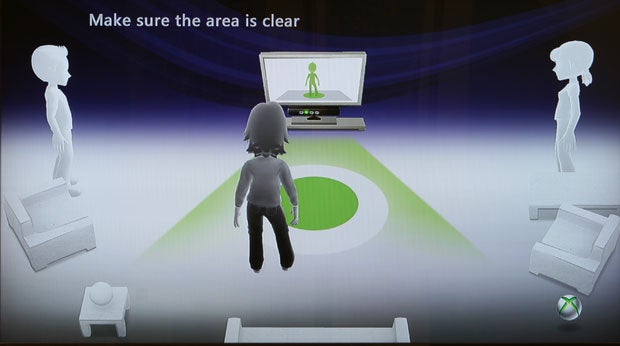
Your actual living room space is the most immediately important variable in setting up a Kinect, and also really the only one that can be a dealbreaker. Make no mistake: You need a large living room, in the right shape, to be able to use the Kinect at all. The Kinect requires a large rectangular space free of obstacles in front of the TV, so get comfortable with hauling your coffee table away when you want to play.
Microsoft suggests a space of six feet by six feet in front of the Kinect sensor for one player, and eight feet by six feet for two players. (The Kinect can currently only handle two players at once, though that’ll probably change in the future.) In my experience, those numbers are the bare minimum–for comfortable and spacious play, I’d recommend eight-by-six for one player and ten-by-six for two players. Get ready to shove your couch backwards and haul your coffee table into the kitchen–it’s a necessary evil of playing Kinect.
Even the bare minimum is going to disqualify a lot of living rooms, due either to shape (that long and skinny living room may be big on paper, but it won’t work here) or size. Sorry to pretty much rule out the entire island of Manhattan, but before you buy a Kinect, break out the measuring tape.
The Sensor
The sensor is an amazing piece of hardware-software synergy, and luckily, it’s actually a pretty flexible device. Its movable head allows it to aim up or down, so you have a pretty lenient set of rules as to where it can be placed. Microsoft recommends between two and six feet off the ground, either directly below or above your TV, and centered with it. In my experience, two feet above the ground might be a little low, especially if your living room isn’t enormous–it’ll be tricky for the sensor to capture both your feet and head.
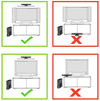
Kinect Sensor Placement
Above the TV sounds great on paper, but unless you want your TV to get really friendly with a lot of duct tape, you’ll need to buy the separate Kinect TV mount, which costs $40. Luckily, the sensor works just fine when placed on your TV stand. Make sure to move it as close to the edge as possible, so its view isn’t blocked by the stand itself, and feel free to stack it on some DVD cases or whatever to give it a little extra height.
Don’t bother trying to tilt the sensor up or down–it’ll make this horrible clicking protestation, since it actually has a motor inside that’ll tilt it to the correct angle automatically. You can actually break it by trying to forcibly point it up and down, so just leave it alone, you monster. And don’t put it in a cabinet, like the one your TV might sit on: The sensor needs room to breathe and move about and it should not be confined inside tight spaces.
One last rule: Do not place the sensor on top of a speaker. That’s mostly aimed at those of you with center speakers, but be careful about the location of your TV’s speakers as well, if you’re using those. More about that in the “Audio” section below. Nearby speakers can screw up the Kinect’s audio sensors, and vibrations can screw up its video sensors, which would remove the Kinect’s reason for being and possibly its sense of identity. You don’t want to be responsible for the self-loathing it would feel if that happened.
The Light
Again, Microsoft really came through here: The Kinect is remarkably flexible in terms of operability under various lighting conditions. That’s not to say that there aren’t things you can do to help it out a bit, of course. Your enemies in this case are natural light (as usual, am I right, nerds?) and halogen light. Try to avoid having either natural or halogen light on the players while in play, and obviously don’t shine light directly onto the sensor itself.

Bad Light!
Kinect works best in dim, but not dark, conditions, with even lighting throughout. If you have big windows, shade them during the day, and don’t light up your living room like a dentist’s office at night. The reason to avoid utter darkness is simply for fun’s sake–the Kinect will definitely recognize gestures in the dark, which is good for controlling movies. But dim lighting is the best compromise for the gleeful awkwardness of playing Kinect: You want to be able to see your fellow players, but you don’t want harsh clinical light to make their every move even less flattering.
The Video
The video side of the home theater setup is much less important. The Kinect works best, in general, with a modern HDTV, simply because it’s an Xbox 360 peripheral and was designed for one. The specifics–LCD vs. plasma, 60Hz vs. 120Hz, Samsung vs. Not Samsung–don’t really matter any more than usual. Just remember that you’ll be in a different viewing position: You’ll probably be moving your couch backwards (if you can), and you’ll also be standing rather than sitting, so your TV might seem smaller and lower. That’s not to say you need a big honking TV, but if you’re using one that’s a bit small for your room in its pre-Kinect state, you might end up squinting a bit.
The Audio
Audio is a little trickier than video. The Kinect will force you to do what seems like an unnecessarily exhaustive audio setup when you first plug it in. But it is not unnecessary! The Kinect’s voice recognition feature may end up being ultimately as useful as the video sensors, and it’s important to get it right. The setup does a pretty good job of calibrating itself, but it’s too polite to lecture you about your home theater setup. That’s what I’m here for.

Kinect Microphone Calibration
If you’re using the speakers in your TV, stop. Don’t do that anymore. Not only are they almost universally lousy, but they’ll make your Kinect experience (not to mention your TV, movies, and music experiences) suffer. Go buy some kind of stereo. The Kinect works best with either a stereo (two-channel) or Dolby 5.1 surround sound setup. Don’t let me pressure you into dropping an extra grand on audio equipment, but a decent used receiver and a couple of speakers, or even one of those home-theater-in-a-box setups frantically flogged on Black Friday, will do you very well here.
5.1 systems feature a center speaker that should be placed just about where the Kinect sensor should be placed. Do not place the sensor on top of the center speaker, even if it balances really nicely or matches perfectly. Having a sound source that close to the Kinect’s four microphones will dramatically undermine its ability to separate human voices from other sounds, and thus make it much harder for the Kinect to understand you.
If you’ve decided to disobey my very clear directions to go buy a reasonable stereo and stop living like a caveman, note where your TV’s speakers are and try to place the Kinect sensor away from them.
The Outfits
The optimal outfit for playing Kinect is a full-body, non-reflective leotard in a neutral color. (A scuba suit can work in a pinch.) But even though our bodies are all beautiful in their own way, they’re mostly not, and there are perfectly suitable apparel alternatives that won’t scar the retinas of other people in the room. Really, just try not to wear shapeless clothing–the Kinect sensor relies on being able to pick out limbs and joints, so don’t wear a poncho or a cape or a garbage bag or anything else that obscures your shape.
Dress Nicely for Kinect
The Kinect is also able to detect faces (which is both cool and creepy, but that’s a point for another day), so don’t wear anything that covers your face. If, on the other hand, you are a burglar who is breaking into a Best Buy to steal some stuff, and you want to try out the Kinect because maybe you’ve heard so many great things about it in such publications as PopSci, and you want to sneak into and out of said Best Buy undetected with your loot–well, without making judgments (is it wrong to steal a loaf of bread to feed your etcetera?) or assuming anything about the attire of curious technophile thieves, you both can and should wear a ski mask. Because if you don’t and the Kinect recognizes your face and the police find you because of your oversight and there’s a headline sometime next week reading “High-Tech Burglar Caught by Microsoft Kinect,” I will definitely write about it, and I’m liable to make fun of you, which might damage your self-esteem or confidence in your illicit career choice or professional pride.
All that being said, normal clothing generally works fine.
Happy Kinecting!