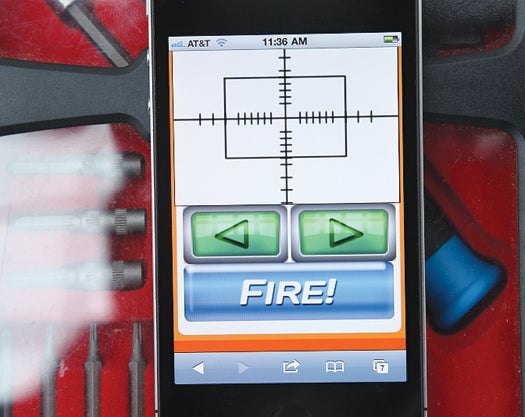
Ryan Rusnak programmed a three-second delay between trigger and release so you have time to put down your iPhone and set up for the catch. John B. CarnettSHARE
I have a background in programming, but a program by itself has limited use. I was like, man, I need to make a project that will actually control something. I had my old mini-fridge from college lying around and, I thought, how about an iPhone-controlled drink vending machine? So I did it . . . and it sucked. You could control it from your living room—or from China—but the cans just rolled out onto the floor. It was a pain to walk over and get them. I wanted to get a beer to travel from the fridge across a room with minimal effort and maximum cool. Go here to see how you can build a beer cannon just like Ryan’s.
I called my friend Graham Phero, and we started building a new version. We thought it would be awesome to use compressed air to propel the cans, but we had no idea how much pressure to use. We started with 100 psi and destroyed a can of beer on the ceiling of a garage. After that, we started at 10 psi and worked up.
Slowly the rest of the project began to take shape. The vending mechanism is a series of slanted shelves built inside the fridge, with a servo at each end. The beer is funneled into a cannon, and the whole thing is mounted on a lazy susan, allowing it to turn so you can aim the throw. My friend Josh Lilly helped me design an iPhone app that could select a beverage, aim the cannon, and fire it.
How It Works
Time: 2 Days Cost: $400
Drink Storage: The shelves angle down slightly so the cans roll to the dispenser. At the lower end, an arm attached to a servomotor holds the cans in place. When the servo receives a signal to retract, a can is sent through a cutout in the fridge and into the cannon barrel.
Air Supply: An air compressor plugs into the wall and connects by a hose to the expansion tank, a short, capped PVC pipe. A regulator valve between them controls the pressure in the tank. Optimal pressure for lobbing a can of beer 15 feet: 45 psi.
Valve: A sprinkler valve plugs into the expansion tank and holds the pressurized air in until you’re ready to fire. It’s attached to an electric relay that will open it for a tenth of a second, releasing the air from the tank and forcing it down the barrel.
Barrel: The barrel pipe should be just wide enough to accommodate a can without creating excessive friction. Too much space between the can and the barrel wall will let air escape past the can and diminish pressure.
Each type of beer and soda has its own shelf. John B. Carnett
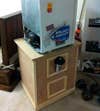
Turret: The whole assembly sits on top of a Lazy Susan. Using a fixed joint that provides a 90-degree turning radius, a servo moves the assembly to aim the throw.
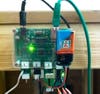
Microcontroller: An ioBridge 204 microcontroller, which lets users control devices via the Internet, is the brains of the operation. It connects to the vending and turning servos and has an Ethernet port to link to the Web.
Relay Board: When the app commands the robot to toss you a beer, the message is directed to the relay board, which directs a pulse of current from a nine-volt battery to the sprinkler valve, opening it momentarily so the cannon can fire.
The App: The vend button sets off a series of commands. First the servo for the selected drink’s shelf drops, pausing to let a can roll by. The door on the front of the fridge housing opens, and you aim with the left and right arrows.
Rusnak is getting a master’s degree in Human-Computer Interaction at Carnegie Mellon University in the fall. You can get full instructions to build the project and search for “Beer Cannon Controller” in the iTunes store to download the app for free.
Step 1: Vending Mechanism
Create the beer supply storage. The storage consist of vertical front and rear plexiglass walls secured to horizontal shelves. Cut the width of the shelves slightly larger than the length of the beer can. Angle the shelves to allow the beer to roll along the shelf. Add additional shelves for added beer variety. Cut a small slit at the dispensing end of each angled supply shelf to allow for the servo that will retain and dispense the beers. Secure a servo to each shelf by gluing it to the bottom of the shelf so that one arm of the servo protrudes through the slit in the shelf. Align the beer supply storage within the fridge and cut a vending hole through the side of the fridge insulation to allow the beer to exit the interior of the fridge. Take care not to cut through the copper refrigeration piping that may be present within the fridge wall.
Step 2: Air Cannon
Create a compressed air cannon out of schedule 40 PVC pipe. This includes an air supply tank, an expansion tank, a 1″ electric solenoid sprinkler valve, and a barrel. Select PVC pipe that has a slightly larger diameter than the beer can. First create an expansion tank by capping one end of a section of PVC pipe and connect the opposite end to the sprinkler valve through appropriate PVC fittings. Connect the barrel to the other end of the sprinkler valve through similar fitting used for the expansion tank. Next, connect the air supply tank (typically a compressor and tank used for compressed air tools) to the expansion tank. Utilize a regulator between the air supply tank and the expansion tank to prevent excess air pressure from reaching the expansion tank. Build a structure to house the air cannon and place the cannon under the fridge/vending mechanism so that vended beers exit the fridge and enter the barrel of the cannon. Place the structure and fridge on a lazy susan or other suitable pivot mechanism to allow the structure and fridge to rotate when the cannon is aimed. Use two lengths of flat metal and secure one end of each of the lengths of metal to each other using a pivot joint. Secure the other end of the first length of metal to the non-movable base of the lazy susan with a pivot joint. Secure the unused end of the second length of metal to a servo mounted on the housing using a fixed joint. This allows the servo to rotate the structure and fridge. In order to turn the fridge from the internet, add a variable position servo widget and assign it to the port where the servo is connected.
Step 3: IO Fridge
Add a servo smart board to the iobridge 204 micro controller. Add a “single servo position widget” to the iobridge dash board using the location that retains the beer on the shelf. This setting is the “up” position. Next, find a value that is 90 degrees away from the up position to release the beer and create another widget for this “down” location. You should now have two iobridge widgets on your iobridge dashboard that you can name “servo up” and “servo down” respectively. Complete this step for each servo that will be vending beer. You now have a working vending machine! But what fun is that? Let’s shoot some beers. In order to create a internet controlled switch, you will need an iobridge relay board. Pick a port on the iobridge and assign a “Digital Output Pulse Widget.” Assign its pulse width to 100ms . Connect the wire connecting to the positive side of the nine volt battery to the “common (C)” screw terminal on the relay. Connect the negative wire to one of the wires on the sprinkler valve. Connect the remaining wire on the sprinkler valve into the “Normally Open (NO)” screw terminal. This will create a digital switch that will open the valve for one tenth of a second when the “Fire” button is pressed releasing the compressed air and firing your beer. Hook it up exactly like I did in the picture and you can skip all the electrical jargon. Editor’s note: adding widgets on the iobridge dashboard is extremely easy so I did not go into detail.
Step 4: Download App
Download the Beer Robot App from the App store and input the appropriate widget ID’s as you are prompted.
Step 5: Practice, Practice, Practice
Please be safe and do not put excess air into the cannon. 60 PSI of air is enough pressure to propel a 12 oz beer can approximately 15′-20′ depending on the size of the expansion tank. PVC is not designed to withhold air and will splinter if the pressure is too high. Schedule 40 PVC is rated to withstand 140PSI of liquid and is not rated for air. Accordingly, PLEASE keep the air pressure well below this threshold. Never aim the cannon at anyone and when working on the cannon, please make sure there is no air or beverage in the cannon.