The wall-mounted PC
Hang an old laptop in the kitchen or hallway to create a touchscreen web panel and message center.
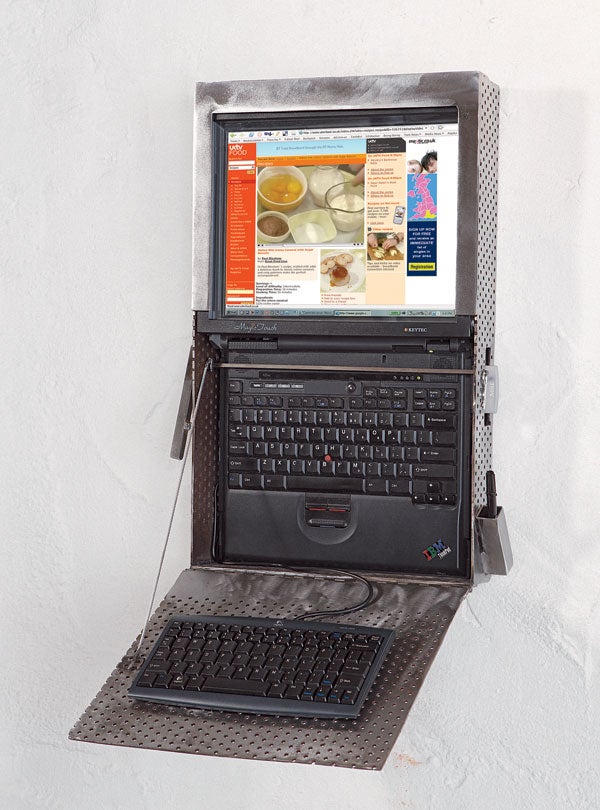
This story has been updated. It was originally featured in the February 2007 issue of Popular Science magazine and involves outdated technologies and services. For current advice, consider turning your old computer into a Chromebook, buying a wall mount for a monitor, or choosing a tablet to hang on your wall instead.
The enclosure is what makes this project cool—without it, you just have a laptop hanging on a wall. We used steel, but any material that fits your decor will work, so long as it’s strong enough to hold the laptop. As laptops are different sizes, it’s best to use our box as a general design guide and create a a cardboard mock up that fits your laptop before breaking out the steel or wood. That will also allow you to customize it to fit your WiFi card slot and other ports that you might want access to.
- Project: make a wall-mounted PC
- Cost: $200
- Time: 4 hours
- Difficulty: easy | | | | | hard (Editor’s note: 3/5)
Materials
The case is made almost entirely of 1/8-inch-thick perforated steel. We used old rusty stock that was very cheap, then welded and polished it with a grinder, then clear-coated it to reduce future rust.
Dimensions
- The unit overall is 13 3/4 inches wide and 22 inches long (top to bottom).
- Side panels are 3 1/4 inches wide at the top and 2 1/2 inches wide at the bottom. (They are wider at the top to accommodate the touch screen.)
- The flip-down panel is 11 1/2 inches long and 13 3/4 inches wide; the piano hinge makes up the rest.
- The rear plate is 13 3/4 by 22 inches. The box’s edges rest on this plate.
- The pen holder is just 1-inch-square stock steel with an end plate welded on.
Tips
Make the open box to fit the laptop first. You can check fit as you go, then create a frame for the screen from 1-inch channel steel to cover the 1/8-inch rough edges of the box and the black plastic edges of the screen.
Then fabricate the flip-down panel to meet the lower screen area. Tack weld the hinge as you check fit. Then refit the unit together and mark the slot for the WiFi card. Remove the laptop before you cut the slot with a grinder.
And always: USE THICK LEATHER GLOVES WITH THE GRINDER, safety glasses, and ear protection!
Instructions
1. Find an old laptop. Any PC or Mac will do. We used a 5-year-old IBM ThinkPad.
2. Enclose it. We welded a frame out of perforated steel, but you could use plastic, wood, or even cardboard.
3. Add a touchscreen: The MagicTouch overlay plugs into a USB port and costs $160 at touchscreens.com, but you can find similar models on eBay for as little as $40 (some require a stylus). Be sure to get one made for a laptop (not a full-size monitor) and that matches your screen size.
4. Give it WiFi: Use a PC-card adapter (from $15; newegg.com), because it leaves your USB ports free for the touchscreen and keyboard.
5. Plug in a keyboard: Instead of trying to type on the vertical laptop, we added a Logitech PlayStation keyboard ($10; amazon.com) to the flip-down panel, which is activated by a lever and stops at 90 degrees for easy typing.
Three things to do with your wall PC
- Make tasty meals. Lots of sites, including epicurious.com, allrecipes.com, and foodtv.com, list recipes, but uktvfood.co.uk offers more than 1,000 video recipes, so you can hit play and start cooking.
- Keep track of everyone. Set up an account for your family at backpackit.com, which lets you create a calendar, post photos, leave notes, and set reminders. Everyone can have his or her own page, and you can update the site from anywhere.
- Show off your photos Set the laptop’s screen saver to Slickr (free; cellardoorsw.com), which automatically makes a slideshow out of photos from your Flickr account.