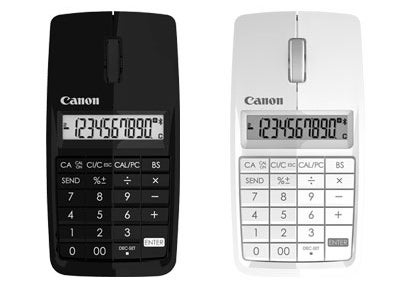
The spirit of innovation. Convergence. Convenience. My hat is tipped to the Canon X MARK I calculator-cum-mouse for embodying it all. But it's not satisfied with mere mousing and calculating; it also serves as a Bluetooth number keypad for your PC or Mac.
And as Gizmodo points out, this odd little gadget is not the first time Canon has attempted this Holy Trinity.
The X MARK I will be available later this year in the U.K for £40. Hopefully it will make it across the pond.
Five amazing, clean technologies that will set us free, in this month's energy-focused issue. Also: how to build a better bomb detector, the robotic toys that are raising your children, a human catapult, the world's smallest arcade, and much more.


Online Content Director: Suzanne LaBarre | Email
Senior Editor: Paul Adams | Email
Associate Editor: Dan Nosowitz | Email
Assistant Editor: Colin Lecher | Email
Assistant Editor: Rose Pastore | Email
Contributing Writers:
Rebecca Boyle | Email
Kelsey D. Atherton | Email
Francie Diep | Email
Shaunacy Ferro | Email
wow. innovative but is it really necessary?
lol is this a joke?
Ok... as someone who does works in accounting and finance on a laptop without a 10 key, this would actually be helpfull if I could avoid fat-fingering entries.
Now if some one can use the mouse as a mouse and then use the calculator at the same time ill applaud then
This is actually pretty neat. I am curious to know if the calculator will act as a second keyboard input so that they can type with one hand and enter calculator entries with the other.
If it sends and received texts, I'm in.
I have a laptop with a number pad but I can see how this would be useful for those who don't. Instead of buying a different laptop, they can get this mouse :-)
Of Course. Put a number pad under your hand where you can't reach it.
At approximately $60 US, this is a little spendy, but it could be useful. I often use an external keyboard and mouse with my laptop because of the lack of a numeric keypad and the irritating trackpad.
However, they should have used the PC layout. Yes, it's an actual calc, and it can be used off line ( at least it would seem so). But, PC users are generally quite familiar with the standard numeric layout.
@ford2go - as far as I can tell it i the standard pc layout. The only really differences are the 0's and some of the functions, but the numbers all all in the same places. And a 00 is super useful.
As an engineer who when making models/prints can't remember what 11/64" is to 3 decimal places or want to calculate how to space out 6 holes over 11 inches evenly in my head I can see this as very useful. I'm constantly busting out the start>accessories>calculator. Pulling out a TI-89 for simple math is a hassle.
It doesn't even have brackets... :-(