Give an old TV a rerun
The government is about to turn your oldest television into a useless relic. Instead of heaving the TV into a landfill, here’s how to give it a second life.
We may earn revenue from the products available on this page and participate in affiliate programs. Learn more ›
By now, you’ve probably heard the news: Next February, television will be broadcast only in digital. If you have cable, you’re already covered. If you have an old analog set—anything that pulls in signals over rabbit ears—you can buy a converter box to receive digital signals. But what about that really old TV with the fuzzy screen that takes forever to warm up? Most sets like that can’t receive cable or satellite service and don’t even have any A/V inputs, so a converter may not be an option.
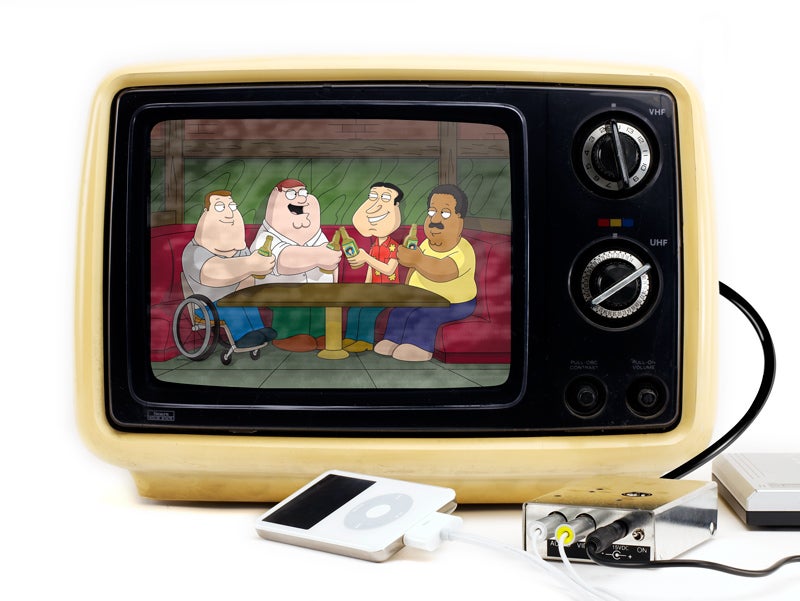
Before you call Antiques Roadshow, however, you should know that with a transmitter kit, a cable and some solder, you can turn it into a monitor for an iPod video, a security-camera feed or an external display for a PC. Not too shabby for a piece of equipment that used to only be good for watching The Jeffersons.
H2Whoa! The TV transmitter kit is designed to work wirelessly, but such use violates Federal Communications Commission regulations. We hacked it instead to create a wired solution that is less likely to cause harmful interference.
How it works
- Time: 4 hours
- Cost: $64
- Difficulty: easy | | | | | hard (Editor’s note: 2/5)
Parts
- A/V transmitter kit (apogeekits.com)
- Twin-lead cable (radioshack.com)
- 12-volt power supply (designnotes.com)
- A/V RCA cables (apogeekits.com)
Instructions
1. Assemble the transmitter kit. Cut a length of the antenna cable and strip both ends of it. Solder one end to the antenna connector’s pins on the underside of the kit’s circuit board. Route the cable out the large hole in the kit’s lid, and connect it to the TV’s antenna screw terminals.
2. Attach the A/V RCA cables to your source device, and connect the other ends to the video- and audio-signal inputs on the side of the transmitter kit. For an iPod, plug the video jack and one of the audio jacks from an Apple composite cable into the kit’s inputs.
3. Turn on your video/audio source, and tune your TV to UHF channel 21.
4. If necessary, tweak the picture and sound quality by adjusting the screws in the holes in the top of the kit’s case.
More ideas for your old TV
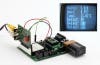
Breathe more life into that ancient TV set by programming a serial video card to display the time, temperature or even Pong.
Parts
- SX video module (SparkFun Electronics #DEV-00749; $35.95)
- Board of Education (USB), full kit (Parallax #28803; $99.95)
- 9-volt battery (local; $3.00)
Instructions
1. Plug the SX video display module into the Board of Education (BOE) carrier board’s breadboard.
2. Connect three BOE kit jumper wires between the SX video display module’s +5 GND and Serial pins, as well as the BOE header’s Vdd, Vss, P0.
- SX video display +5 –> BOE Vdd
- SX video display GND –> BOE Vss
- SX video display Serial –> BOE P0
3. Plug the BASIC Stamp 2 module into the BOE.
4. Attach the BOE to your PC and download your program into the BASIC Stamp 2 module. You can find two sample programs inside the SX video display module datasheet published by Hitt Consulting.
5. Attach the A/V RCA cables to the video and audio signal inputs (J2 and J1) of the A/V transmitter kit. Connect the other ends of the cables to your SX video display module. The module’s yellow RCA jack is for video output and the white RCA jack is for audio output.
6. Plug a 9-volt battery into the BOE.
7. Tune your TV to UHF Channel 21.
8. If necessary, adjust trimmer capacitor CV1 and/or trimmer potentiometer RV2 on the A/V transmitter kit for improving the picture quality. Likewise, you can adjust the sound quality by tweaking the core of the high frequency transformer L4.
9. Your analog TV should now be receiving audio and video signals from the SX video display module with the content supplied by a programmed running on the BASIC Stamp 2 module on the BOE.
10. Try your hand at porting some old BASIC games to the Parallax BASIC Stamp 2 module.
Additional notes
- The SX video display module is capable of displaying six lines of text that can contain 16 characters per line. Each character is 8 pixels wide and 8 pixels high. There are several graphic characters that can be used for programming simple games.
- Communication with the module from the BASIC Stamp is set for 4800 baud. This translates into approximately 480 characters per second. Therefore, an entire screen’s worth of characters (i.e., 96 characters) will take 1/5 of a second for display.
- Character data from the BASIC Stamp is sent as standard ASCII codes (e.g., SEROUT Sout,Baud,[“PopSci”]).
- Pixel data (1/4 character size) can be turned on and off with the serial commands “plot” and “unplot”, respectively. For example, SEROUT Sout,Baud,[PlotXY].
- The SX video display module character set includes 224 characters and 44 1/4 “pixel” graphics. An audio source capable of 255 tones is also available.
This story has been updated. It was originally featured in the June 2008 issue of Popular Science magazine.