Microsoft Surface Finally Surfaces
We may earn revenue from the products available on this page and participate in affiliate programs. Learn more › Remember...
We may earn revenue from the products available on this page and participate in affiliate programs. Learn more ›
Remember Surface, the magic coffee table and massively multi-touch screen that we awarded a Best of What’s New award in December? Well it looks like it’s finally set to debut, as a shopping kiosk debuting at six AT&T cellular phone stores on April 17.
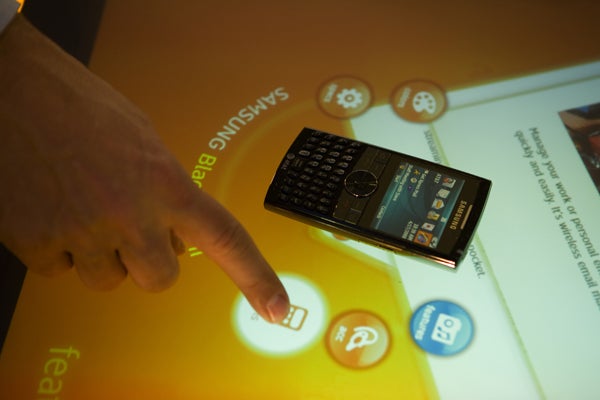
Surface is a 30-inch diagonal screen that that can read thousands of touch inputs at once, allowing multiple people to interact with items at once. It tracks taps using a set of cameras mounted underneath the rear-projection screen. Cameras can also identify objects festooned with stickers containing patterns of dots.
At AT&T stores, you’ll be able to drop one of eight phone models with said sticker onto the screen and watch as it lights up with information such as the phone’s key features and accessories you can buy for it. Place two phones on Surface and it presents a feature-for feature comparison. You’ll also see a coverage map and a list of available calling plans. So you can do the whole deal–picking out the phone, accessories and plan–at once.
Then you have to write it all down and tell the store clerk. Surface could be configured to let you place your order right from the screen, but that won’t be set up in this initial pilot program, featuring a total of 22 tables in New York, Atlanta, San Diego and San Francisco. If it goes well, AT&T may expand the program with more locations and more features.
Mark Bolger, who manages the Surface program at Microsoft, says that the four other customers already announced—Harrah’s casinos, Sheraton hotels, T-Mobile retail storess and casino game-maker IGT–are currently tweaking their on-screen software. “We expect them to deploy…in the spring of 2008,” said Bolger.