Testing the Goods
Is it heavier? Faster? How do old apps look? How's the LTE? You asked, we answered
The New iPad Dan Bracaglia

The new iPad is an uncomplicated update. It's a spec bump year, not a redesign year: what's different, aside from the stunning high-res Retina display, is mostly inside. Internal specifications are important, but what matters most is how it feels to actually use. We've been using the new iPad since Friday, chatting with you guys on Twitter all the while, and here we've pulled together our review as a list of frequently asked questions and answers aimed to help you make that all-important decision: to buy or not to buy?

How does everything look on the Retina display?
With four times the pixels to fill on the new Retina display, we (and Twitter users like @innerarity) were worried that lower-resolution apps and content would look noticeably worse than on the previous iPads' 1024x768 screens. But overall it's actually not as bad as we thought. Streaming video is very similar on both screens—I'm not sure if that's to the new iPad's credit or detriment. But we had trouble spotting much difference at all in quality when watching high-quality YouTube videos and Netflix's "HD" streaming. True 1080p HD videos (at 1920 x 1080 pixels, available via iTunes as of the version 10.6 update), played on the Retina display with a slight but not-unnoticeable improvement in fine detail, color saturation, and contrast.

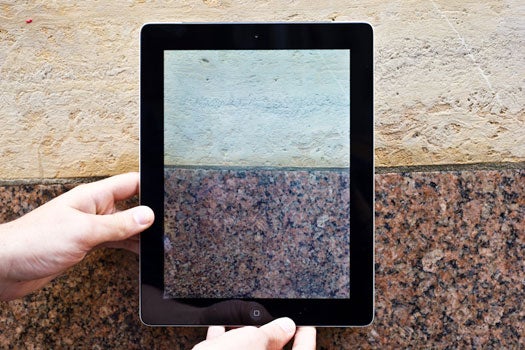
iPad 2 vs iPad 3: Macro Fight: So you can see up close just how tiny and dense these pixels are: the top shot is an iPad 2, the bottom an iPad 3.  Dan Bracaglia

Where you really notice the disparity in image quality on the new screen is when low-resolution images appear next to text, which is almost always rendered razor-sharp by the GPU. This happens a lot during normal web browsing. Modern web pages are designed to fill a browser window around 1000 pixels wide—less than half as many pixels as the Retina display's horizontal resolution—which means most web-resolution images will be stretched on the iPad in comparison to the rest of the page. So until the web is upscaled to approximately twice its normal resolution (whisper: that might take a while!), expect photos and graphics in Safari to look fairly ragged in comparison to the ultra-sharp text right next to them.

Is it faster?
On paper, yes. But in all the apps we tried, we couldn't detect much of a difference compared to the iPad 2. The resource ceiling is certainly higher with double the RAM (512MB to 1GB) and the new A5X chip's quad-core graphics unit (the main processor remains dual-core), but until we see app developers taking full advantage of this new horsepower, the speed boost won't feel significant.

Compared to the iPad 1, on the other hand, we definitely noticed differences--images rendered faster, apps opened immediately, the stuttering that occasionally annoyed iPad 1 owners is totally gone.

How's the battery life?
With limited time and a battery that in some use cases can last into the double-digit hours, we haven't yet tested the battery in a scientifically comprehensive way. But we did run the battery down doing something very strenuous--continually streaming a movie from Hulu--to see how it copes with a difficult task, and we're happy to say it did quite well, lasting six hours and fifteen minutes (or approximately 2.2 viewings of Hoop Dreams).

Any side effects from the bigger battery?
Actually, yeah. Even though the physical body of the new iPad is basically the same size as the iPad 2, the new iPad has a totally new battery. According to our friends at iFixit, the new iPad's battery boasts an energy rating of 42.5 watt-hours, almost double the iPad 2's (at 25 watt-hours). To do that, Apple physically increased the size of each cell by about 70%. That's mostly good news--it needs that extra power to cope with the new processor, memory, 4G LTE radio, and new screen--but it also has one unfortunate side effect. The thing takes forever to charge. To be fair, we're comparing it to the iPad 2, which fully charges in just a couple of hours when plugged directly into the wall, but the new iPad seems to need an overnight shot of power to get back to 100%. Expect even slower charges via USB.
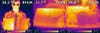
Infrared iPads: Left: both iPads together, with the (hotter) iPad 3 on the left and the iPad 2 on the right. The middle image is the iPad 3, and the right-most image is the iPad 2. Note: John is not wearing sunglasses. Our infrared FLIR gun makes all regular-glasses-wearers look like they're wearing shades.  Paul Adams

Does it get hot? (asked by @AlertCat)
Yeah, it does. It's not going to sear a piece of meat (not well, anyway. Yes, I cleaned it), but it definitely gets hotter than the iPad 2.

Above, we shot both iPads with a FLIR infrared camera to measure heat, and found that it's about four degrees Celsius hotter than an iPad 2 here after an hour or so of heavy use on both--a not insignificant number.

Is it heavier?
Yeah. It's the first iPad--hell, first Apple product ever, in my memory--that is actually thicker and heavier than its predecessor. The differences are slight, but you can tell the difference if you've got them side by side. It's not a big deal, though; there are thinner and lighter tablets out there, but the iPad is still above average (or below average?) in overall size for a tablet. It's pretty small, is what we're saying.

Does the Smart Cover work?
Yes.

How's the voice recognition? A good replacement for Siri? (asked by @CharlesCrawford)
No. The voice recognition, employed here primarily as a text-entry method, is kind of awful. It can only reliably recognize the simplest of words, spoken slowly, and--wait, did we say "reliably"? No. It can't really do that, either. Our experience with Android's voice recognition system for text entry has definitely been better. We're kind of unimpressed by voice control to begin with, so we don't really miss it, but if you're expecting to dictate your next research paper or thousand-word love letter to your iPad...don't.

How's the new camera?
It's better than the iPad 2's, but that's not saying much. At all. The iPhone 4S's, which is about as good a phone camera as you're likely to find right now, still unsurprisingly blows this camera away. But to back up for a moment: It should be illegal to use the iPad camera for photography. I would consider running for public office in order to co-sponsor a bill that confiscates the iPad of any user who uses the camera in public. It will never not look ridiculous. Vote Nosowitz in 2014.

How fast is LTE? (asked by @TriFantom)
At the PopSci Satellite Office (aka my apartment) in Brooklyn on Verizon's LTE network, we averaged 9.3 Mbps download and 4.51 Mbps upload speeds--not quite as fast as my cable connection at home, but damn close, and way faster than any 3G connection. At our midtown Manhattan office, it averaged an expectedly crazy 27.25 Mbps download and 10.74 Mbps upload. So, basic answer: it's fast.

Optimized Apps: This is StockTouch, one of the apps that's been optimized for the new iPad's screen.  Dan Bracaglia

Which apps look best?
As of now, only a handful of apps are actually optimized for the new screen (those include a few games, like Infinity Blade 2, and some top-tier apps like Flipboard, plus all the built-in apps like Mail and Google Maps). Those look great! Some other apps look intermittently good, especially ones focused on video streaming. Apps that haven't yet been up-scaled are noticeable, though. The interface on IMDb's app, for instance, may look lousy right now, but they'll fix that soon. And the videos still look great.

I want to buy a tablet. Should I buy this one?
Probably. It's the best tablet out there--the only one anywhere near as good is the iPad 2, which is sort of embarrassing for everyone else, but there it is. It's got great hardware, a great operating system, a huge and impressive selection of apps and available content, and most importantly, the iPad has always been really fun to use. So the answer is yes (or, consider capitalizing on the glut of used iPad 2s on the market for cheap).

Should I upgrade my iPad 1 or iPad 2? (asked by @entionDeficit)
Ah, a harder question. I'm going to go ahead and say no if you're coming from the iPad 2. The new screen and faster mobile internet are both great, but they're spec improvements, not functional improvements: you can't do anything new and different with this iPad that you can't do on the previous version. It just makes all the old stuff a little better.

If you're coming from an original iPad, the question is a bit trickier. The apps and games hungriest for processing power do run noticeably smoother on both newer models. And with a svelter frame, Smart Covers, the Retina display and high-speed 4G, the new iPad may be an attractive upgrade for some craving the latest model. But the original iPad remains a very capable tablet, and again, there's nothing you can't do on the original that you can do on the newer models.

It's possible that once I see some 2,000-pixel images of baby polar bears in an issue of National Geographic in a few months that I'll change my mind entirely, but right now, I think any current iPad owner should save their money and hold out for what Apple uncorks this time next year.

23 Comments

Seems like great hardware. If I can wipe out the current operating system and load Microsoft Windows 8, that would be so cool!

.............................
Science sees no further than what it can sense, i.e. facts.
Religion sees beyond the senses, i.e. faith.

Great review, however, it's not exactly true that there's "nothing you CAN'T do on the original that you CAN do on the newer models". For one, airplay mirroring is not allowed on the first gen iPad (which may not be a big deal to some but I certainly use it)

i still see nothing that warrants the pricetag compared to my smart phone.

I just upgraded from the original iPad to the new iPad. In the review you said: "But the original iPad remains a very capable tablet, and again, there's nothing you can't do on the original that you can do on the newer models."

That is simply wrong. Smart-cover compatibility, FaceTime, iPhoto, trailers in iMovie, rear-facing camera, run any app that requires a camera, and air-play mirroring are all things that the original iPad could not do.

yep, will is right, I guess. I saw the iPad 3 today in Fry's for the first time (I have an original iPad, so I thought I'd have a peek at the new boy to see if there's any difference.)

Is there any difference? Oh yeah. Muy differente. The first bell to go off was a marked improvement in the quality of the display. I have been stoked by the quality of the display on my original iPad. I just saw something today that lapped and passed up the original. The video is much sharper. It's simply gorgeous.

Since it was tethered to the table at Fry's, I couldn't get much in the way of comparison going regarding the speed of the unit. I'll take Walt Mossberg's (WSJ technology critic) word for it. He says the new unit is speedier, tho a tad heavier. OK OK, I say. The processor is an A5X where the last version sported an A5. I guess that means a new number for the processor in iPad, right? Did I remember? Yeah, I did. I got it right.

I'm going to hold off on getting a new iPad at least until there is a new version of CPU. When will that be? 2014 probably, as far as my

Yes, I'll have to agree with Will. But no one should forget the dictation that is only available on the new iPad 3rd generation.

I also think that the new iPad should have had SIRI.

Great article, thank you - very helpful.

For iPad owners wondering about other tablets, hear my story. A couple of months ago I decided I wanted to see what other tablets were like - after all, there are some very sexy, thin, powerful, etc..., Android tablets out there.

I bought one and was amazed how bad the experience was, as a user, versus the iPad world. The hardware may be very nice, but Android software does not compare to iPad usability.

So much of the iPad is intuitive - easy to use - easy to figure out. Updates are easy. Buying APPs is easy. Finding APPs and capabilities is easy.

Not so AT ALL on the Android.

I was stunned at the terrible experience trying to use and learn the Android style of interface.

Anyway, as far as I am concerned, there are three tablets and only three to choose from -- that far exceed any other products available.

iPad 1
iPad 2
iPad 3

You are wasting your time and money going in another direction!

Hope that helps.

Regarding SIRI-

I am guessing that the reason SIRI is not included is because it needs training to work properly. Even though on iPhone 4S you aren't asked to read anything to train it, it is constantly listening and learning your voice whenever you call. Also phone conversations often include common words which it can key in on. Therefore, unless you are using your facetime frequently, then there may be limitations with how it can work.

This is only a theory, but I am sure that they have a good reason for not including it yet. If my theory is correct then they could have it synced via iCloud to an iPhone you own. Or put you through a voicetraining exercise. No doubt though that SIRI on the iPhone 4S is quite impressive.

I wouldn't be surprised if they include SIRI on an upcoming iOS update.

Our test lab measured the iPad Verizon 4G LTE speeds in seven different locations in Portland, Oregon. It averaged 22Mbps download and 10Mbps upload. When we turned off 4G LTE mode, the average dropped to 1Mbps download and 500Kbps upload.

As for OpenGL graphics, GLBenchmark 2 showed the new Retina iPad to be almost 1.6 times as fast as the iPad 2 and 12.8 times faster than the iPad 1.

Main processor integer and floating point processing was almost identical to the iPad 2 but 1.7 times as fast as the iPad 1.

The new iPad's 2048x1536 Retina display is impressive with Retina "aware" games like "Sky Gambler," with high rez photos, and with 1920x1080 movies.

Full report is posted on BareFeats.com.

Gomer here. Seems to me the iPad camera offers a large format alternative, with the promise of more features to come. I have moderate visual three line impairment and increased two point discrimination test for keyboard aggravation, see wikipedia. I agree it is unwieldy, and the camera seems to attract my thumb or finger somehow until I settle down and brace. It requires a fingertip grip sometimes. I've used it to capture an entire length of a damaged item and my right shoe to forward to a shop computer screen for repair estimate, for instance. The shoe is a bonus.
The photo shown on the article actually shows an possible life size example if there were a flaw.
I'm new to this, however, and perhaps a HD cell camera would allow software (not on my computer) to regain scale.

Robot03/20/12 at 3:01 pm
Seems like great hardware. If I can wipe out the current operating system and load Microsoft Windows 8, that would be so cool!
.............................
...and it would be worthless! An interesting kitchen table project but of no value

The original iPad had no camera, so there are tons of things you can do with the iPad2/3 that can't be done with the original iPad. A smart device with a camera is far, far, far more powerful than one without. Face recognition, ocr and translation, distance estimation, etc. are some applications which immediately leap to mind that require a camera.

It may be an unfair question given the limited performance expected of the iPad, but how does it compare with a MacBook Air? The cost differential is not that great anymore and it seems that if one is doing more than watching flicks or reading e-books, a full-fledged, light laptop might be the better buy. Ironically, Apple seems to be pushing iPads over Airs, I assume because the profit margin is higher.

"Even though on iPhone 4S you aren't asked to read anything to train it, it is constantly listening and learning your voice whenever you call."

Doesn't anyone find that just a little bit scary?

Great comments (for the most part) ... I got the New iPad on day one, and I really LOVE it compared to the original classic, and sorry, I also love it as a camera ... a note: comparisons of iPad with iPhone and other smart phones are meaningless to me ... admittedly, I am a geezer at 64, but there is not a smart phone out there that these old eyes can use without serious strain (well the AARP-sponsored Consumer Cellular has the Doro PhoneEsy, but not really a smart phone)... I hope that as so many of us boomers are moving into retirement, companies will get smart and create phones that have even larger displays (maybe flip up magnifiers?) with large text modes and simpler interfaces for aging minds as well as eyes ... I think there's room for big profits in this area (but that could just be the Alzheimers talking). P.S.: My ranchmates and I retired our HTC Incredible Android phones early and went back to simpler, gentler phones and couldn't be happier (but you won't be able to pry the iPad from my hands in any case)

"i still see nothing that warrants the pricetag compared to my smart phone."

The iPad costs $499-829, check out how much your smart phone costs without the subsidized contract... I think you'll be surprised how much it costs relative to the iPad with a screen that is about one eighth of the size...

Right mow I am using a a LG optimus Andride phone. I am planing to to buy an ipad 2. Hope it will fulfill my requirement.

Features of IPad (new) are marvelous and quite user-friendly. I have Ipad 2 and it has battery problems. Some added new features are quite amazing. Definitely going to purchase it as early as possible.Touch system and new look is very impressive and retina display with four times pixels make it market leader. I suggest you to switch your style from IPad1 to New IPad. Its not crazy because new IPad is fantastic with added features. Try to make it at your best. Its cost is from $499-829, which is not so costly at all as compared to other products in real market.
for more details follow at:
http://www.techyv.com/article/difference-between-ipad-and-ipad-2

I am glad to read your post but there are much more things to be discussed here.We are here to provide you the best product which can bring a change in your life that is CCTV camera. It will help you at every stage of your life.

Popular Tags

Regular Features


June 2013: American Energy Independence

Five amazing, clean technologies that will set us free, in this month's energy-focused issue. Also: how to build a better bomb detector, the robotic toys that are raising your children, a human catapult, the world's smallest arcade, and much more.


Online Content Director: Suzanne LaBarre | Email
Senior Editor: Paul Adams | Email
Associate Editor: Dan Nosowitz | Email
Assistant Editor: Colin Lecher | Email
Assistant Editor: Rose Pastore | Email

Contributing Writers:

Kelsey D. Atherton | Email
Francie Diep | Email
Shaunacy Ferro | Email

circ-top-header.gif
circ-cover.gif
bmxmag-ps