Feature
In the conclusion of our three-part series, we'll put the finishing touches on our custom home-built Hackintosh PC running OS X
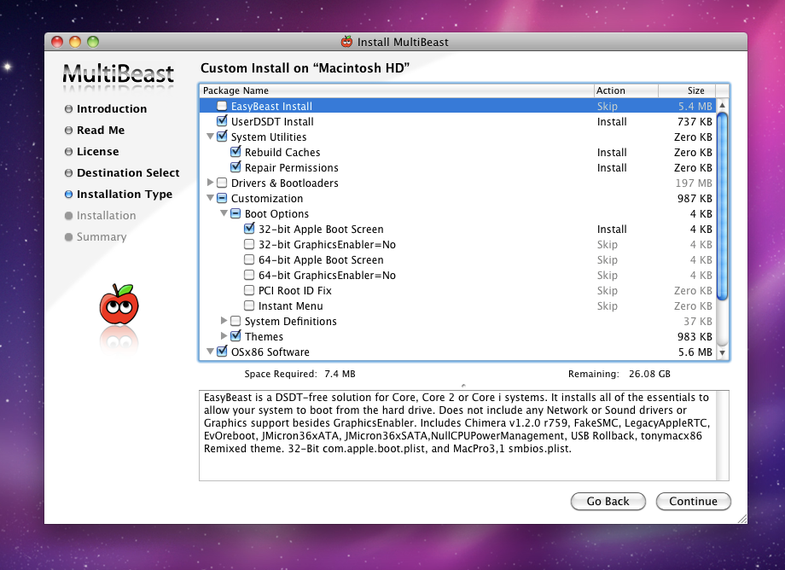
MultiBeast on Snow Leopard

Now that you have the parts all squared away for your home-built Hackintosh PC running Mac OS X, it's time to perform the third and final magic step: installing OS X Snow Leopard and configuring it for maximum performance. In the final installment of our three-part guide, we'll walk you through just that. Home stretch!

For this guide we'll be focusing on the Core i7 950-based setup we've detailed in the previous installments. This is definitely the part of the process that involves the most step-by-step instructions, so rather than risk botching something in translation here I'm going to point you to the guides I used. But like before, we'll cover the basic concepts here first so you have some understanding of what's going on. It helps!

As you know by now, we'll be relying on the "iBoot+MultiBeast" method for Hackintoshing, brought to you by the fine folks at tonymacx86.com. The first half of this guide will be an annotated walk-through of Tonymac's main instruction set for MultiBeast, and in the latter half we'll be using this hardware-specific guide to configuring MultiBeast. So bookmark those two pages now.

As you may have gathered, this is a two-step process: First, we'll burn a custom boot CD intended to trick OS X into thinking your computer is an EFI-based machine ready for Snow Leopard. Then, after starting up your fresh OS X install with the help of your iBoot disc, we'll run MultiBeast to configure hardware and install a bootloader that will boot OS X (and any other OS) from your hard drive. Let's do this.

Preparing Your BIOS

The first step is adjusting your BIOS settings to prepare for OS X. Assuming you're using a Gigabyte motherboard, you do this by following the instructions to enter BIOS setup immediately after turning your computer on (usually by pressing the Escape key). Then, it's just a matter of matching the configuration spelled out by Tonymac in the first step of his guide. Don't worry, you'll only have to deal with these scary screens once.

Installing Mac OS X

Following along with Tonymac's guide, the next step is to download the iBoot disc image and burn it with Disk Utility or something similar. Turn on your computer with this disc in the drive, and it should boot from it (if it doesn't, you can press F12 at startup on a Gigabyte board to manually select your boot disc). After some optical drive whirring, you'll soon see a screen like this:

iBoot:

At this point, pop out your boot disc and insert your Snow Leopard install disc (this has to be a retail Snow Leopard disc, not one that comes with a new Mac.) Press F5, then wait for the Mac OS X Install Disc icon to show up. Press Enter to boot when it does (if you have problems, there are some troubleshooting tips on Tonymac's guide). Once the installer is up and running, follow Tonymac's instructions for partitioning and formatting your disk (this will erase everything, remember).

OS X will go through its standard install process. If you're using an SSD like I recommend, feel free to take a moment now to marvel at how quickly the install takes place. Also, it's likely that the OS X install screen will look stretched and distorted while you install--don't worry, this is normal.

Once OS X is done installing, you'll restart and boot from your iBoot disc again. Now, on the Chimera bootloader screen, you should see an option for your fresh Snow Leopard install. Choose this and voila, hopefully OS X boots as you'd expect.

On my system, sound and ethernet were both working immediately, which is nice. Your display resolution may still look a little funky at this point, but that will be fixed once we enable full graphics card support with MultiBeast. Before doing that, follow Tonymac's instructions for downloading and manually applying the latest Snow Leopard update package (currently version 10.6.7). You want to run the MultiBeast app before running the upgrade, then do your MultiBeast install once the upgrade finishes without restarting your computer.

Running MultiBeast

Think of MultiBeast as a package installer, not an app in its own right. What it does is let you pick and choose from an assortment of device drivers and enablers to install; you'll only need the ones that apply to your hardware. Most of what MultiBeast installs ends up in two folders: /System/Library/Extensions or /Extra/Extensions. It also comes with some handy utilities you may need, under the "OSx86 Software" heading--go ahead and install these too. And in addition to installing software, you can use MultiBeast to rebuild your kernel extension (kext) caches and repair your system permissions, which are both necessary whenever you add or remove a kext. These options are filed under "System Utilities." If you ever need to change anything, you can run MultiBeast again and choose only the new options you want to change--it doesn't remove anything from previous installs.

As I mentioned before, there is a guide on the tonymacx86.com forums with MultiBeast settings for our exact hardware build (the guide was originally written by MultiBeast's main developer MacMan, and has since been updated to accommodate changes in newer versions of MultiBeast by forum user notshy. Big thanks to these guys). The subsequent discussion thread is full of users with the exact same hardware, so it's a great resource for asking troubleshooting questions and reading up on others' experiences.

To install, first grab the correct DSDT file for your motherboard's firmware version (explained in more detail in part two of this guide) and copy it to the desktop. Then, it's just a matter of matching your MultiBeast checkboxes to the install guide:
Specific MultiBeast Settings:

After a restart, you should be able to boot without your iBoot CD and, once installed, enjoy a perfectly working OS X install with full sound, networking and graphics support. Huzzah.

Troubleshooting + Tips

With Hackintoshing, there's always a chance something might not go exactly according to plan. So if your machine doesn't work perfectly from the get-go, or little things like sleep aren't functioning the way you'd expect, take a deep breath and hit the tonymacx86 forums. Someone in there has almost certainly experienced something similar, and hopefully has shared a solution to their problem. Here are a few common troubleshooting pointers:

  • Keep your iBoot disc: If booting from your hard disk should fail for whatever reason, you can always boot again from your iBoot disc to get into your system. Booting from iBoot loads a vanilla set of barebones extensions that should work in most cases. Once you're back in, you can run MultiBeast as many times as you need to fix the problem.
  • Software updates: The great thing about the MultiBeast install is that OS X's Software Update works just like it does on an Apple Mac. But before installing an OS X system update, it's a good idea to check out tonymac's site to see if anything has changed. There's always a chance that a new update could do something funky. Since building mine though, I've updated from 10.6.6 to 10.6.7 without a hitch.
  • 64-bit?: On the tonymac forums, you'll find a lot of folks talking about whether to run a full 64-bit version of the kernel (the core system software) or the default 32-bit kernel. I'd explain what that means, but it's probably not even worth it. All you need to know is that it may sound like 64-bit is the much speedier way to go, but for 99 percent of folks (me included), Apple's 32-bit kernel is just fine. The cool thing about OS X is that 64-bit apps like Photoshop will run in full 64-bit mode even when you're running a 32-bit kernel. And a 64-bit kernel can cause all kinds of problems with older devices and other apps that may not have 64-bit support. So you can cross that obsession off your list.
  • /Extra/Extensions: Keep an eye on this folder to see everything that MultiBeast installs on your system. Also, keep it backed up so you can roll it back should anything go haywire. Reverting to a snapshot of this folder's contents when things were running smoothly is a great troubleshooting technique.
  • Updating MultiBeast?: MultiBeast is updated fairly frequently to include additional support for the latest hardware components. Technically speaking, it's a cinch to update individual components from within MultiBeast (I just recently updated to the new Chimera bootloader, which had better support for my graphics card). But if you don't have any specific complaints with your system, I'd leave things as-is. When I updated the bootloader, somehow my /Extra/Extensions folder was wiped clean. It took me a while to figure that out and get things back to normal. So if it's not broken, don't fix it! (unless you're willing to troubleshoot new issues).
  • Unplug stuff: USB devices (or combinations of USB devices) can sometimes complicate things. If your system is behaving badly and you can't figure out why, unplug all your USB gadgets and add them back one at a time to see if you can find the culprit.

Windows Too!

Installing Windows on your Hackintosh is as easy as slapping in a fresh hard drive in addition to your OS X disk and installing Windows on it. The Chimera bootloader should recognize it immediately, and you can use the Chimera startup screen to choose between booting OS X or Windows. It's great.

So, that's about it. I hope these guides were helpful and that some of you have been inspired to try your own Hackintosh system. Also, don't forget to check out part one and part two of our guide.

Want to read more articles like this, plus tips and tricks, home hacks, DIY projects, and more? Subscribe to Popular Science today, for less than $1 per issue!

14 Comments

This is nice and all but what is the purpose of this?
I thought one of the attractions of macs was the design of the hardware, in my eyes this is just restricting a homebrew computer to select components all for the sake of an OS that doesn't add any real value to the typical user.But each to their own...

I agree... Why invest so much money buying components for a Hackintosh?

If you are building your own computer, you probably shouldn't be using Mac OSx.

@Xenthis: For some people, its just because they can and want to try it. For others it will be because they want or need a Mac and this is a cheaper option than buying a high-powered one. Most of the graphic designers that I have known wouldn't touch a PC with a 10' pole. This would be a good option for them, just not a good option for the people that buy them "cuz they're purty."

On the inside Apple hardware is nothing more than PC. A popular PC company we all know makes apple motherboards. Take of the fancy over priced, over designed case and what you have is a high end PC with a few custom tweaks to make it boot. Its not quite that simple but close. I've got 5 Macs running like this ( won't call them Hackintoshes, because its not a Hack, its a Mac. en every sense. ) Even built one for my retired parents to get them off the PC and they LOVE LOVE LOVE it. Its been 5 years now since I started doing this with PC hardware and I will never look back. I love OSX, but not apple's over priced plastic and aluminum cases.

Mbrd71, I've experienced that throughout my career and to be quite honest, the whole idea that Macs are better for graphic designers is utter hogwash. It only survives because people keep repeating it and the sort of peer-pressure that exists in the field. There is no actual advantage a Mac has over a Windows PC when it comes to graphic design. None whatsoever. Windows PCs can do everything a Mac can do just as accurately and then some.

It's just an example of unwarranted snobbery.

I find it fairly weird as well, since the main attraction of OSX over Windows or Linux is the fact that things tend to work without tweaking, and a person capable of putting the machine together in the first place is necessarily capable of doing said tweaking. I suppose that if I had to choose between OSX and Windows, I would use OSX, but still, the investment of time just to get a less attractive box for slightly less money seems a bit absurd.

I do see the appeal of taking it as a challenge, naturally, since it's something Apple is after all going out of its way to discourage, but it's still a bit silly.

@Moabyte: Well there was one main difference under the hood, the overpriced apple hardware has a RISC (reduced instruction set) processor at is core (another example would a Sun ultaSpark), while x86 chips are CISC (complex instruction set). Both processor types have their pros and cons, but the x86 architecture/instruction set really caught on with the pentium chips, hence the greatly reduced price. For some reason beyond my comprehension, Mac fanboys are still willing to shell out the big $$ to own one, (even though apple started including cheaper intel x86's back in 2006).

hey, where's the BIOS in windows 7, using a hp dm1 ultraportable laptop for gaming. when i turn on the pc, it displays a blinking line then runs hp quickweb. then i start windows and displays a blinking line again then the splash. Where's the BIOS?

I have to say that these Hackintosh Diaries make it look like one needs to go out and buy special components to make it work and also seem far more complex than it actually is. This sort of perpetuates the myth that a Mac is something more than last years PC with a different operating system. Dual booting my Aldi special Medion with Windows 7 took less than an hour. The only issue was the sound card was not recognised. A cheap USB (from Hong Kong via eBay) sound card worked okay until my son found a way to make his sound work on his Dell laptop Hackintosh. I have not found anything that does not work as it should so far.

@Seasnake: If you are building a custom PC rather than buying a pre-built PC, buying the wrong component will lead to issues since there won't be the correct driver support for your hardware. Mac OS X is an OS on a PC just like Windows, but unlike Windows, it doesn't have as much driver support since Apple will only include drivers relevant to the hardware they use and as such aren't completely bug proof for non-Apple hardware. For example, those who opt for a GTX 460 for their video card have found that, while it works with Hackintosh, they experience an issue called the "Fermi Freeze" where the kernel panics when the card is idling and so have had to come up with inventive ways to keep the card from ever idling. This same issue isn't experienced by those using a GTX 480. Carefully selecting your hardware if you're building a Hackintosh is necessary if you're not that comfortable messing around with the kexts/drivers.

@Xenthis: Some of us grew up on Macs and just have a preference for the OS since we're intimately familiar with how it works :P

@Kobukson
Your first arguemnt simply proves that Apple is just using PC hardware withc a much smaller HCL (hardware contro list)/
They are still using PC hardware.

And the arguement also shows that Apple collaborates with few hardware vendors - that is never a good thing. And to add insult to injury, the vendors it does work with, usually, make drivers for PCs that run much better. Their GPU as a good example.

The argument of growing up with macs doesnt hold water as its old Mac OS died a miserable death and they changed to OSX in 2001 - it was hella buggy until, I'd say, around 2005-2006. And since there is no general registry, alot of program writers have different styles of where to put things. Its a haphazzard OS that is fast but non collaborative. This again, is why it never took off from the start and never will gain much marketshare other than those who are sheep or hobbyists.

Choice. It's about choice. And after all these years of being told that it's about choice, mostly by Linux users, you still do not get it.

It's about your right to choose what kind of hardware you want to use. It's about your right to choose what OS and software you want to use on your hardware. It's about choice.

Is choice, and how it applies to computer hardware and software so complicated that you can not understand it? Is choice so foreign to you that you can not understand what it means?

Or is it that you have made the choice to let someone else tell you what you can and can not do with the hardware and software that you use, that you own? To let them dictate to you what you can and can not do with your computer.

It's about choice.

And this article, actually series of articles, is ment to help you make informed, educated choices. And that if you choose to use OS X on hardware other then the overpriced version that Apple forces on you. Then you can. And it's really not that hard to do.

It's about choice.

Make your own. And not let someone else make them for you.

@ katie saucey

ummm macs currently use the same intel CPU's as windows PC's. an Intel core 2 duo, i3/5/7, etc. in a Mac is the same as one in a dell, hp, etc. the OLD macs had RISC cpu's ( mainly motorola ) but that was long ago in computer terms. that is why windows can also run on a mac because the hardware is now the same. the same company makes the motherboards for both, called Foxconn. open a MAC... Foxconn motherboard with an intel cpu, open a dell... foxconn motherboard with an intel cpu. ram, graphics, hard drive. all the same. the case and software are about the only differences. i once used ram from a dell laptop to upgrade a macbook, OSX and windows are both x86 ( or x64 ) systems now.

* If you want to read my rant, read on. Here is the summary statement though: If you are at all interested in building a Hackintosh, please just go spend some time with people who actually do it. Do not put much or any weight on what people in this thread are (trying to) argue. This PopSci series was actually pretty good. Now head over to tonymac, etc.

- Why build one of these? Because I want to. Because I want a Mac Pro but cannot afford $2500-$4500 for one and would rather spend 1/4 to 1/2 of that for one that will run as well and probably better. Because it is fun.

- "Most people like Apple for their design so why build your own?" Those people don't have to build their own. "Most" people does not include "all" people. You would think this would be evident.

- "If you are building your own computer you probably shouldn't be using Mac OSX." Why not? Mac OSX is a great OS. I have built computers using Windows and Macs. What does the ability or desire to build a computer have to do with which OS one should use? I find that I use my Macs FAR more than my Windows PCs because (overall) I prefer the interface, the stability, the reliability and the fact that the 2007 iMac I am typing this on is only slightly less peppy today than it was when I bought it almost 5 years ago. I can't say that for ANY of my Windows PCs, built or purchased. Again, whether someone can build a PC has nothing to do with what OS they should run.

- Yes, Macs use computer parts. Of course they do! And yes, fewer of those components come ready with Mac drivers (to keep it simple). So what? If you don't like this, then move along. There is no doubt that a "pro" of building a Windows-based PC is the proliferation of parts available, but that is only one factor and one that must be weighted with many other factors. I am glad I have the freedom to choose to build a Mac even if I have a limited number of ready-working components to chose from.

That said, YES, it is very important to choose the right components. Anyone who says otherwise shows they do not know what they are talking about. Anyone who has spent considerable time working with Hackintoshes can attest to the fact that the wrong components will either not work at all or will lead to frustration down the line.

- Also, building a Hackintosh is not the same as dual-booting. I have no idea why someone would refer to dual-booting while trying to argue that component selection is not that important.

Most of the arguments against the Hackintosh on here are fallacious or ignorant or both. Frankly, while slightly dated now, this was a great article for someone wanting to build their first Hackintosh. As for the haters on here, they have done nothing more than prove that stupid fanboyishesque-argumentation and logic is not limited to those annoying Mac Fanboys.

Popular Tags

Regular Features


June 2013: American Energy Independence

Five amazing, clean technologies that will set us free, in this month's energy-focused issue. Also: how to build a better bomb detector, the robotic toys that are raising your children, a human catapult, the world's smallest arcade, and much more.


Online Content Director: Suzanne LaBarre | Email
Senior Editor: Paul Adams | Email
Associate Editor: Dan Nosowitz | Email
Assistant Editor: Colin Lecher | Email
Assistant Editor: Rose Pastore | Email

Contributing Writers:
Rebecca Boyle | Email
Kelsey D. Atherton | Email
Francie Diep | Email
Shaunacy Ferro | Email

circ-top-header.gif
circ-cover.gif