Build It
For a great time, call the National Institute of Standards and Technology
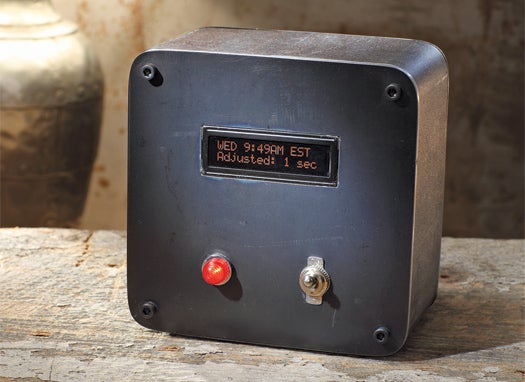
The Time is Right The clock picks up the time signal from radio transmitters near Fort Collins, Colorado. John B. Carnett

Reading a clock is one thing; really knowing the time is quite another. For everyday timekeeping needs, we use a standard known as Coordinated Universal Time, or UTC, which is derived from International Atomic Time, a consensus of more than 200 clocks that keep precise time based on the movement of electrons.

Using a receiver module, you can build a clock that picks up one of the U.S. UTC radio broadcasts, called WWVB. A microcontroller decodes the WWVB time signal that the receiver pulls in, while a separate real-time clock module (a regular microchip-and-crystal-based timekeeping mechanism) keeps the clock running like a normal clock. When a new time signal has been received that differs from the clock’s current time, the microcontroller updates the clock. The signal will come in better at night and when atmospheric conditions are best for long-range radio reception. When it does come in, the project will give you the best time you’ve ever had.
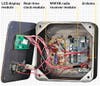
Atomic Timekeeping:  John B. Carnett

Build an Atomic Clock

Time: 2 Hours
Cost: About $80
Difficulty: Hard

  1. Buy or build a clock enclosure.
  2. Follow the schematic here to build the circuitry, and attach the real-time clock and WWVB modules to the auxiliary circuit board. Connect leads to the Arduino pins as you go.
  3. Wire the connections between the Arduino and the display. We used a 16-character, two-line LCD.
  4. Download the software and program the Arduino.
  5. Set the dip switches to indicate your time zone.
  6. Fire up the circuit. When the receiver pulls in the WWVB signal (which may take until nightfall in noisy radio-frequency environments far from its origin in Colorado), the display will update to the correct time and indicate that the adjustment has been made. The front-panel light will blink in time with each pulse received and decoded, once per second when all is working properly.
Want to read more articles like this, plus tips and tricks, home hacks, DIY projects, and more? Subscribe to Popular Science today, for less than $1 per issue!

40 Comments

You must have rated this project as 'hard' because the schematic is not available at this site. Where is it?

I agree, this has been frustrating me for days. I got excited when i saw the article because I already have most the components that are needed. When I went to the link the page wasn't even available yet, now it's here without the schematic which is kind of pointless. They could at least least let us know when it'll be available or at least a part list with the required radio module.

The code and the schematic will be available Real Soon Now. Tomorrow, by all accounts. I'm chasing the last few bugs as we speak. Sorry to frustrate everybody. Hang on just a little while longer.

What is the enclosure that you used? Where can I get one like it?

And for that matter, the rest of the hardware too?

@tmercswims The enclosure is made from a 2" section 4" x 4" x 1/4" wall steel tube. The front and back panels are 1/8" sheet. It's heavy, but it had the look I wanted and I had the materials on hand when I needed them.

The back panel is welded on and the front panel bolts on to those tabs with tapped holes welded into the corners at the front of the tube.

It is fairly easy to make with some basic metal working skills.

The software and schematics and such are up.

I'm new to this site. Downloaded files but how do I read the .pde files? Thanks

Thanks a ton for this article,
and the BOM, Instructions, Code and Schematic!!

I've been researching this for some time, and now I'm ready to jump in.

One question: Why are Time Zones not supported?
UTC is 8 hours away.

Do I "hard code" my time zone in the code?

please help!

Great article and something I've been interested in for some time now. I downloaded the files but the .pde files are unfamiliar to me. What do I need to open them.

About the .pde files...I figured it out. I had a system crash last week and had to start from a bare drive. Windows failed to associate the .pde files with WordPad so I had to do it manually.

About the .pde files...I figured it out. I had a system crash last week and had to start from a bare drive. Windows failed to associate the .pde files with WordPad so I had to do it manually.

@SparkMark The code currently only works in terms of UTC because, well, I just didn't get around to writing support for time zones before this article had to go live. I'll be releasing a new revision fairly soon that provides time zone support.

The time in the WWVB broadcast is UTC. So, when I add the time zone support, it will add or subtract the appropriate number of hours to that value and implement wrapping around the days as needed.

The updated version should appear on this page and it will also be available here:
http://github.com/vinmarshall/WWVB-Clock

@ytram, @GV-TDI Those .pde files are just text files with C code. You can work with them in any text editor. The Arduino program will program this code onto your Arduino board.

OK. Now how do I program the Arduino and receiver module? I downloaded the .PDE files but is all scrambled text. How?

I won't start anything until all pieces are together.

@cdb The code (.pde) files shouldn't be scrambled. They should be plain text C code. Try downloading those files from the github link in the comment above.

Then, once you have those files and you've built the circuit, you can get the free Arduino programming software here:
http://arduino.cc/

The ugly enclosure goes quite well with the ugly table it is sitting on!

Please do not compress your files for the sake of people who do not use zip files. Also, adobe is getting is getting crankier with their free version reader,,,

@jei You can download the files from the github repository without any archiving or compression. The link is a few comments up from here.

I just want to know why there is no atomic clocks in our cars? Why have a radio clock is constantly not set right? I am going to disable the power to the damn thing and buy an atomic clock for the car. I wish I was smart enough to integrate this project in with the car radio!

I have contacted several radio manufactures and asked them why, but never heard back from any of them.

So, how much solar energy have you used today?

Any chance of having 24hr format supported?

@Digital_Cowboy It actually supports 24 hr format currently and not 12 hr format - contrary to the version in the picture. An upcoming revision will support 12 hr time (and time zones).

@jei
What's wrong with zip files?

@vinmarshall

That's good to hear as personally I prefer the 24hr format. And any clock/watch that I own that I can change the format on from 12 to 24hr format I do.

Live Long and Prosper

When I try to verify and compile I get an error " In function 'void buffer(int)': error: a function-definition is not allowed here before '{' token "
I'm using the Arduino 0018 ide. I would love to get this to work please help
Mark

I get this error message on line 95:

error: 'wwvbBuffer* buffer' redeclared as different kind of symbol In function 'void setup()':
In function 'void loop()':
At global scope:
In function 'void setup()':
In function 'void loop()':

I'm pretty novice at programming and really have no idea what the problem is. I do notice that "malloc" *(line 95) is not used anywhere else.
Please help.
This is Awesome! I've been wanting to do this for a while now with the Arduino but have had no idea how to start. Thanks in advance.

An atom clock that I finally do not have to go to WalMart for. What will they think of next?

Hi I've built this, (your parts list didnt mention the 10k pot, btw) And I have a few issues, first the 2 capacitors, are they only needed for the simulator? and can we simply eliminate that .pde file and those caps filtering the power supply if we dont intend to use the simulator and just want the clock to work? Second, and this is why i signed up for this account so i could post here, Once I build and verify it (with or without the caps,) I only get on the LCD 00:00:80 UTC with the second 0 underlined, and an "x" below that underline... once in a while the LED fed from the cmmr flickers, but thats all I've seen in the last few hours, is this normal behaviour until it syncs?

If only it had an alarm
I would totaly want to get one of these

@johnalockbur It would be pretty easy to build alarm clock functionality into this if you wanted to. You'd just have to add some input mechanism for setting the time and bit of code.

@borgar Yeah - the 'X' means there is a bit error - that is, the bit just received wasn't a 1, 0, or frame marker bit. You'll see that and have a default time until the first frame comes through. You need 1 minute of good reception. Try putting it near a west facing window overnight tonight and see what you get. The capacitors aren't strictly necessary, but they filter the power to the WWVB receiver module and are generally a good idea. You're right about the 10K pot - I'll update the parts list.

@beni82411 and @vankanma -- I'll look into your issues this weekend. It may be easier to sort out if you get in touch over email.

Hi

What power source did you use?
From the picture, is the switch only connected to the Arduino?

@pjwild1

Just any old 5V power supply should work fine.

The switch switches power between the power supply connection and the Arduino board. The auxiliary board takes power from the Arduino board.

UPDATE: Anyone else who has questions or problems building this should get in touch with me via email. This is far enough off the front page that I may miss the questions in the comments. Good luck!

-vin

Hi... I hope you get this message and it is not cryptic. Let me know, I look forward to hearing from you.

P.S. I tried your email address (vlm@2552.com) but I'm not sure it is operational - I didn't hear back.

I read over your article in Popsci and felt compelled to create this application. It is just what I needed to calibrate the DS1307 which is running in several situations.

I'm concerned about the display output I have been getting and don't have enough information about how to decipher it. I thought perhaps you could give me some feedback. I have had the operation run over 24 hours.

I can't tell if it is syncing at all.

I seeded the DS1307 with a date and time stamp. Since the initial set up, the time is changing but the date not. In any case. both values are incorrect - even if I take in consideration a 1-2 hour difference. I located in Michigan (EST). So the time difference should be 1-2 hours for Central/Mountain Time - right? But the minutes are not accurate - not even close.

The led attached to pin TCON on the CMMR-6 chip, periodically faintly flickers. I changed the resistor to a 330ohm thinking it would be brighter - but it isn't... Not sure why?

Here is what I get on the display - I don't know if the values should change - which ones most often. I guess leap year would not. I'm wondering about the changing 0,1,X values...

1st line: hh:mm:ss UTC (oscillates with 0, 1, X values)
2nd line: multiple output:

WWVB Signal:
LY: NO LS: NO
DST: No
UTI 0.0
[ ]
01 2000

Hello

I'm gathering up the pieces to start building the clock and my one question is has anyone found a different colored display to use, I would like something with blue in it that would look nice in the night

Thanks!
Bill

@twodisks Sparkfun Electronics, from whom I sourced the display for this project, has a few different color options. Have a look at the various "Basic 16x2 Character LCDs" in this search on their site: http://bit.ly/9EzzFq

@adumas Hi - I got your email. I'll reply to you shortly.

Hello

On the case aluminum or plastic ??? Will a metal case affect the signal??

Thanks
Bill

Hey,
Does the receiver need to be on the outside of the case? I bought everything and set it all up. I got the same thing that borgar was getting. I left it outside facing West for two night and the X was still there. I've looked through all the code and checked all my wiring. Is there any other reason this isn't working correctly? does the antenna need to be aiming somewhere?

Right now I am using no Arduino and just the 328; when I'm finishing it, I am gonna use an Arduino Pro. How did you mount stuff inside of your project and make it look good, like the LCD?

Thanks in advance!

Where do you get the DIP switches? They seem rather important.
How do you use them to set the time zone?
How do you set up the 5V power supply and from where?

On the schematics, some of the wires say to connect to 5v. I assumed this was to go to the 5 volt power supply but there are 5 of them.

Hi

My name in for now Orion, i have read today the magazin and i decide to try and built this clock.
i have few questions for someone who know the answers:

1) As you can see, my English is not a legend, i am from Israel so it makes the deal harder?

2) For now i am 17 years old and next year i am going to the university to learn electrical engineering so for now i have only knowledge in physics. It is possible to built it with out no basic knowledge in electronic?

3) There is more instructions besides of the picture???

4) In what a kind of place can i find all what i need to built it?

5) is this realy hard?

tanks you, sorry for my bad English.

Popular Tags

Regular Features


June 2013: American Energy Independence

Five amazing, clean technologies that will set us free, in this month's energy-focused issue. Also: how to build a better bomb detector, the robotic toys that are raising your children, a human catapult, the world's smallest arcade, and much more.


Online Content Director: Suzanne LaBarre | Email
Senior Editor: Paul Adams | Email
Associate Editor: Dan Nosowitz | Email
Assistant Editor: Colin Lecher | Email
Assistant Editor: Rose Pastore | Email

Contributing Writers:

Kelsey D. Atherton | Email
Francie Diep | Email
Shaunacy Ferro | Email

circ-top-header.gif
circ-cover.gif
bmxmag-ps