Building a vintage digital jukebox
Turn your old laptop into a standalone MP3 player.
This story has been updated. It was originally featured in the October 2004 issue of Popular Science magazine and involves outdated technologies and services. For current advice, consider turning your old laptop into a Chromebook, or browse our more recent projects and tech tips.
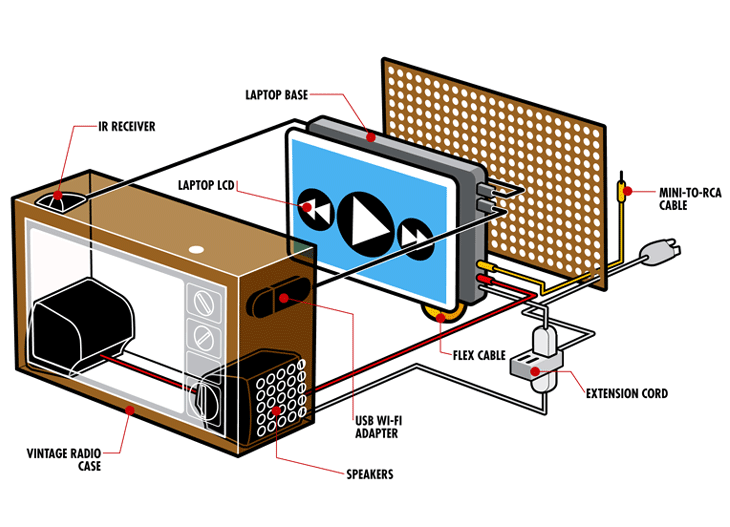
What can you do with an out-of-date computer—one that still works but has ceased to be your everyday machine? That’s the question H2.0 posed to me recently. And although there are dozens of answers (Editor’s note: We’ll bring you more in the coming months), it got me thinking about what I could build from an old laptop. I finally hit on the idea of gutting a vintage radio and stuffing the laptop parts inside to make a jukebox that can store and play MP3s or send them to a home stereo. It can even be wirelessly networked to stream songs from a PC or play Internet radio stations. Just about any old laptop and radio will work, and the only challenging part is detaching the laptop screen from the base without ripping the flex cable that connects them. The rest is simply hot-gluing the parts in place, plugging in the accessories, and loading it up with songs.
- Dept: DIY
- Tech: recycled laptops
- Time: 4 hours
- Cost: $75 to $410
- Difficulty: dabbler | | | | | master (Editor’s note: 3/5)
The parts list
- Pentium II or better laptop with at least a 266MHz processor, 128MB RAM, USB ports: free to $200
- Vintage radio: free to $50
- Powered speakers: $10 to $50
- USB WiFi adapter or WiFi card: $20
- Short multi-outlet extension cord: $5
- IR PC remote: $40
- (Optional) sound card or external audio processor: $50
Sources
If you don’t have an old laptop and radio lying around, check garage sales or eBay. All other parts can be found at your local electronics store or online—see streetprices.com or froogle.com for price comparisons.
Instructions
1. Remove the plastic bezels around the LCD and the laptop base (usually held on by screws). Remove the screws in the hinges that attach the LCD to the base.
2. Carefully unwind the flex cable between the LCD and the laptop base. (In some laptops, you can unplug it from the base to prevent ripping during the build and plug it back in later.)
3. Remove everything from inside the old radio.
4. Cut a rectangle just smaller than the LCD from the radio’s speaker panel and hot-glue the LCD behind it, facing out. Be sure the flex cable is not under stress.
5. Drill several small holes in the sides of the radio case, and mount the speakers against the holes. Plug them into the headphone jack on the laptop (or the USB audio processor).
6. Plug a mini-to-RCA cable into the lineout jack. Plug in the USB WiFi adapter or WiFi card.
7. Plug the IR module for the remote control into a USB port and set it on top of the case.
8. Plug the laptop and speaker power supplies into the short extension cord (so you only have one plug coming out). Add a switch to the cord, or drill a hole in the case that gives you access to the laptop’s power button.
9. Replace the radio’s back cover. Rock on.
Necessary extras
- To control your jukebox, add a remote control, such as the $40 Streamzap PC Remote (streamzap.com).
- If your laptop doesn’t have a line-out port (for playing through your home stereo), add a USB audio processor, such as Xitel’s $50 Hi-Fi Link (www.xitel.com).
- The only software you need is something to play MP3s, such as WinAmp or iTunes.